
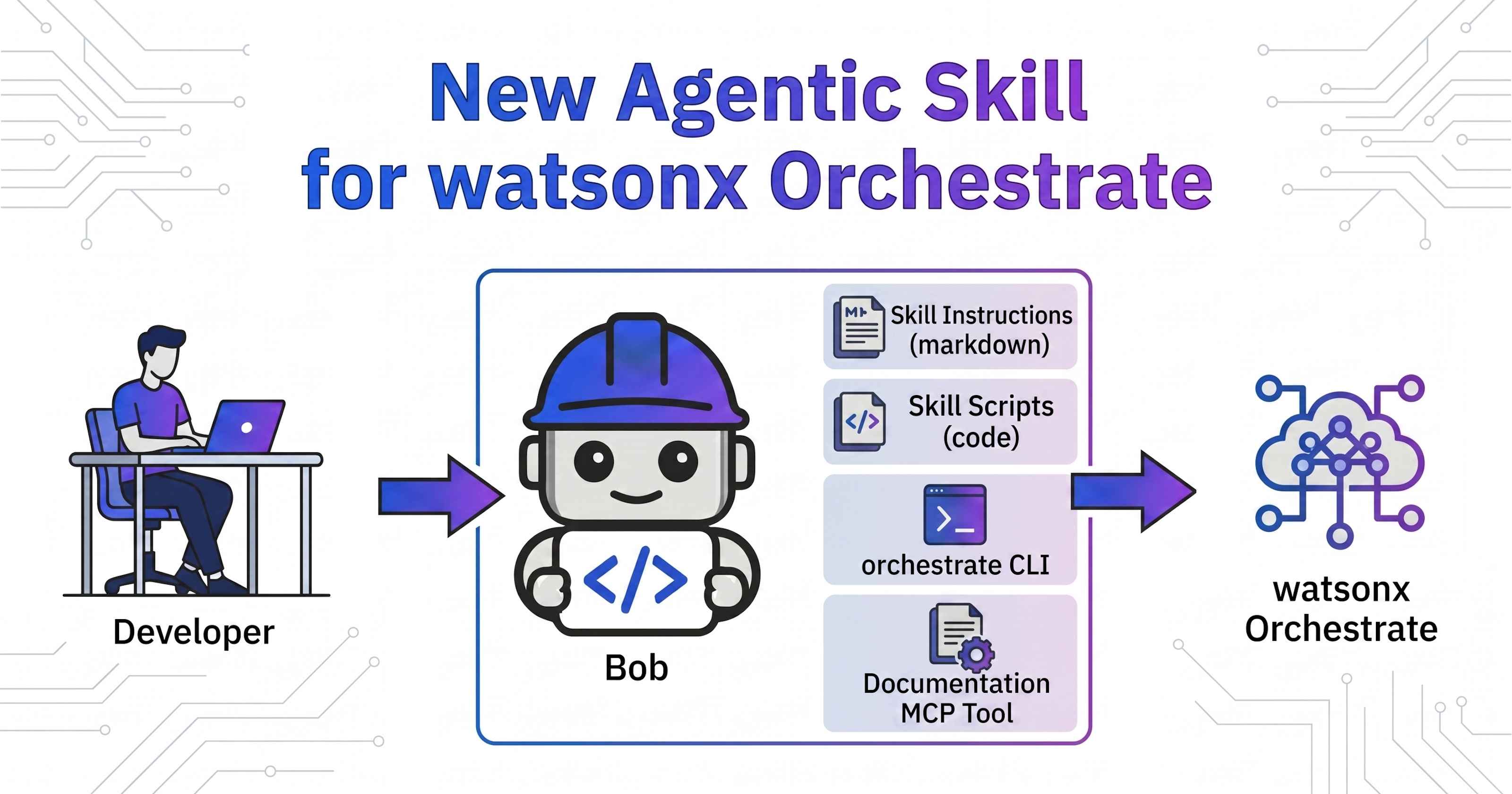
Agentic software development tools like IBM Bob require customization via skills and tools to interface with external platforms like IBM watsonx Orchestrate. This post introduces a new community-built watsonx-orchestrate skill. It significantly boosts developer productivity when creating new agentic applications, extending existing frameworks, or debugging and monitoring deployed agents.
The skill is fully open-source and was primarily developed by Florin Manaila, with contributions from other IBMers and myself.
For deeper technical context, you can check out my related blog posts:
- New Agentic Skill for watsonx Orchestrate (this post)
- Accessing watsonx Orchestrate Environments via Agentic Skill
- Testing multi-turn Conversations in watsonx Orchestrate via Agentic Skill
Structure
The new skill optimizes resource consumption by loading information only on demand. Here is a look at the file structure:
- SKILL.md
- references
While the metadata in SKILL.md is permanently loaded into the context, the rest of the skill is pulled dynamically. Markdown files within the references directory load as needed, and the included shell scripts are designed for direct execution.
Concepts
The skill provides a lot of instructions which often eliminates the need to search in the documentation via the MCP server. Because these instructions are explicitly tailored for AI agents, they are more concise than standard user manuals. This results in lower token consumption and fewer model invocations. The broader documentation MCP tools are only called upon if the skill lacks a specific piece of information.
Additionally, the skill provides clear guidance on complex, multi-step workflows that can otherwise be difficult to find in standard documentation. For example, it maps out the complete asset lifecycle:
1
2
3
4
setup 'orchestrate' CLI → scaffold project → write tools (+connections/models/KB)
   → write agent YAML → run 'import-all.sh' (1. import connections
   → 2. import models → 3. import KB → 4. import tools/toolkits → 5. import agent)
   → run test (see 3.5 Test) → debug → re-import → deploy to production
Note that this framework explicitly defines the dependency order for importing Orchestrate assets (e.g., importing connections before tools and agents).
It also standardizes project directory structures. The included import and deletion scripts are particularly useful, allowing developers to iterate quickly when testing and running agents directly inside Orchestrate.
1
2
3
4
5
6
7
8
9
10
my_agent/
├── README.md
├── agents/            my_agent.yaml
├── tools/             *.py  (one @flow per file; @tool can be grouped)
├── connections/       *.yaml (kind: connection)
├── knowledge_base/    *.yaml + source docs
├── models/            *.yaml (kind: model) — only if adding a custom model
├── import-all.sh      orchestrate ... import commands, dependency-ordered
├── delete-all.sh      orchestrate ... delete commands, counter-part to import-all.sh
└── .env               secrets (gitignored)
Drawing from early developer feedback, the skill also includes optimizations for typical scenarios. For instance, because different models may be deployed across distinct Orchestrate environments, the skill queries the ‘orchestrate’ CLI to fetch live, active models before attempting an import. This proactive check prevents unnecessary CLI failures and error messages.
1
source .venv/bin/activate && orchestrate models list 2>&1 | head -40
Perhaps the most valuable feature is the capacity to test and run agents directly within actual Orchestrate environments instead of merely generating local code. I will cover this capability in upcoming posts.
The skill currently supports the Orchestrate ADK 2.12.0.
Functionality
The skill serves as a comprehensive toolkit for managing the end-to-end Software Development Lifecycle (SDLC) of Orchestrate agents, moving far beyond basic code generation. It assists developers by:
- Outlining primary Orchestrate assets and defining clear agent lifecycles.
- Explaining how to build agents and tools using the Agent Development Kit (ADK).
- Accelerating the setup of the local orchestrate CLI.
- Standardizing CLI execution and integration with the documentation MCP server.
- Importing assets and executing tests against live Orchestrate environments.
- Interfacing directly with native watsonx Orchestrate APIs.
- Embedding the watsonx Orchestrate chat widget into custom applications.
CLI Usage
While utilizing the watsonx Orchestrate ADK MCP Server is optional, the skill provides explicit instructions for running the orchestrate CLI directly. This often removes the need to configure and load a separate MCP server into the context window.
1
2
3
4
5
6
7
8
9
10
11
12
13
14
15
16
17
18
19
20
21
22
23
24
25
26
# 'orchestrate' CLI reference

Verified against **'ibm-watsonx-orchestrate' 2.12.0** (groups/commands confirmed live;
original catalog from 2.12.0). The CLI evolves — **always confirm with
'orchestrate <group> --help' and 'orchestrate <group> <cmd> --help'**. Short flags are
shown in '()'.

Top-level groups:
'env', 'agents', 'tools', 'toolkits', 'knowledge-bases', 'connections',
'models', 'server', 'chat', 'channels', 'settings', 'evaluations',
'observability', 'voice-configs', 'phone', 'partners', 'workspaces'.

[...]

## agents

| Command | Key options |
|---------|-------------|
| 'agents import' | '--file(-f)', '--app-id(-a)' (external agents), '--safe' |
| 'agents create' | '--name(-n)', '--kind(-k)', '--description', '--llm',
'--style', '--instructions', '--tools', '--collaborators', '--knowledge-bases',
'--output(-o)', external: '--title(-t)', '--api(-a)', '--auth-scheme',
'--provider(-p)', '--auth-config', '--nickname', '--app-id',
'--context-access-enabled', '--context-variable(-v)' |

[...]
If the ADK MCP server is active, the skill routes requests through it; otherwise, it defaults directly to the CLI.
1
2
3
4
5
6
7
8
9
10
11
12
13
14
15
16
17
18
19
20
21
22
23
24
25
26
27
28
29
30
**2. MCP orchestrate ADK**
Gives Bob direct access to all commands within the watsonx Orchestrate ADK.
MCP Server: 'watsonx-orchestrate-adk' with tools like 'chat_with_agent', 'list_agents',
  'list_tools', 'list_toolkits', 'list_connections', 'list_models', 'export_agent',
  'get_tool_template', 'check_version', etc. — read state from the active environment.

[...]

## Tests

There are two ways to run these tests dependent on whether the 'watsonx-orchestrate-adk' MCP server is available.

#### 1. 'watsonx-orchestrate-adk' MCP server is available

Run the MCP server 'watsonx-orchestrate-adk' tool 'chat_with_agent' for single-turn and multi-turn conversations.

#### 2. 'watsonx-orchestrate-adk' MCP server is not available
'''bash
# Single-turn (1)
./.bob/skills/watsonx-orchestrate/references/wxo-chat.sh -n <agent> "<derived single-turn prompt>"
# → { "thread_id": "3f92692d-...", "final_message": "...", ... }

# Multi-turn (2a) — initial user input
./.bob/skills/watsonx-orchestrate/references/wxo-chat.sh -n <agent> "<derived multi-turn prompt>"
# → { "thread_id": "3f92692d-...", "final_message": "...", ... }

# Multi-turn (2b) — resume
./.bob/skills/watsonx-orchestrate/references/wxo-chat.sh -n <agent> --thread-id <thread-id> -r "<second user input>"
# → { "thread_id": "3f92692d-...", "final_message": "...", "reasoning_trace": {"steps": [...]}, ... }
'''
Next Steps
To find out more, check out the following resources: