
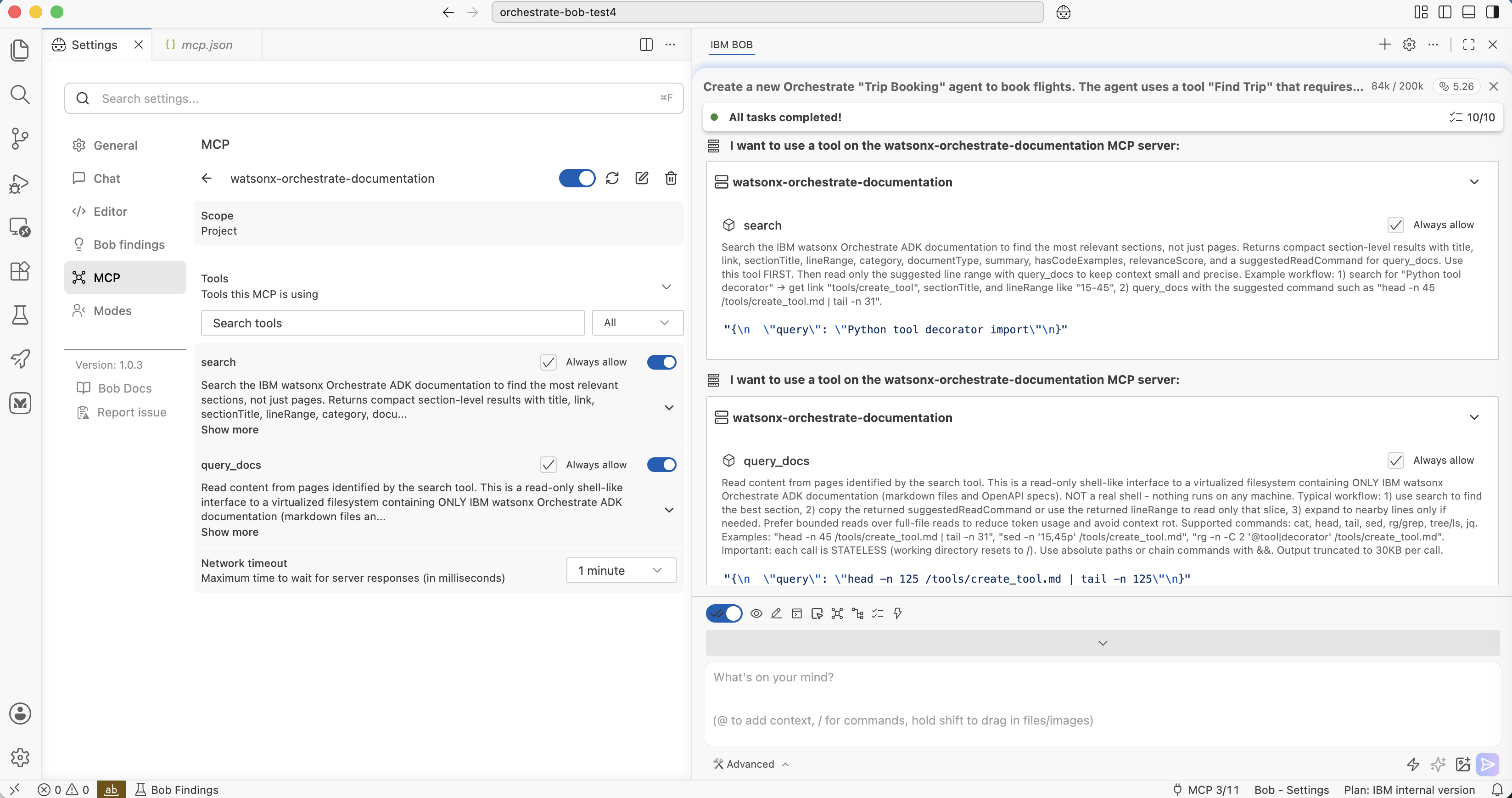
AI-based development tools like IBM Bob are powerful since they can use tools to access live data. To enable Bob to understand how to utilize certain technologies, frameworks and libraries, vendors often provide MCP tools to read their documentation. This post describes an example how these MCP tools can be built.
Even the strongest frontier models are out of date when they are released since they were trained with data from before the release date. Since software is changing frequently, tools like IBM Bob need access to current sources describing specific technologies. Google searches, browser components and computer use can be the fallback, but often it’s more efficient to leverage MCP servers.
For example, watsonx Orchestrate provides an Orchestrate Documentation MCP Server with two tools ‘Search documentation’ and ‘query_docs_filesystem_ibm_watsonx_orchestrate_adk’. For technologies that don’t have MCP servers, open-source projects like context7 can be utilized.
Scenario
As I wanted to understand better how these documentation MCP servers work, I’ve re-implemented my own version of the Orchestrate server as a learning exercise. I like that the official server supports two tools to first run searches and then to drill down on specific search results.
A wide variety of MCP servers and tools are currently available. However, not all of them have been designed correctly to work efficiently with agents.
My goal was to reimplement the two tools ‘search’ and ‘query_docs’. For search, I wanted to use a hybrid (semantic and keywords) search engine. To leverage the second query_docs tool, search should only return short summaries and metadata. The query_docs tool is a virtual file system so that agents can read the information efficiently via standard terminal commands like ‘cat’ and ‘head’.
As a test I used the search ‘Python tool decorator import’. When generating tools, the tool decorator needs to be imported and Bob needs to know the correct import statement. If you only run the MCP server without a skill, it sometimes returns large documents which fills up the context window quickly. My goal was to be able to break these larger documents down by leveraging the markdown sections.
The techniques below might help you to build your own MCP servers. Also, a better solution to this particular challenge is to add this typical scenario to a skill.
Tool: search
Here is the description of the search tool:
1
2
3
4
5
6
7
8
9
10
11
12
13
Search the IBM watsonx Orchestrate ADK documentation to find the most relevant
sections, not just pages. Returns compact section-level results with title, link,
sectionTitle, lineRange, category, documentType, summary, hasCodeExamples,
relevanceScore, and a suggestedReadCommand for query_docs.

Use this tool FIRST. Then read only the suggested line range with query_docs
to keep context small and precise.

Example workflow:
1) search for "Python tool decorator" → get link "tools/create_tool", sectionTitle,
   and lineRange like "15-45"
2) query_docs with the suggested command such as
   "head -n 45 /tools/create_tool.md | tail -n 31"
A list of search results is returned, each one is rather short and contains metadata.
1
2
3
4
5
6
7
8
9
10
11
12
13
14
15
16
17
[
  {
    "title": "Authoring Python-Based Tools",
    "link": "tools/create_tool",
    "sectionTitle": "Importing Python-based tools",
    "lineRange": "169-329",
    "documentType": "guide",
    "category": "create_tool.md",
    "summary": "You can import Python-based tools in two forms: as an individual ...",
    "hasCodeExamples": true,
    "relevanceScore": 1.66,
    "suggestedReadCommand": "head -n 329 /tools/create_tool.md | tail -n 161"
  },
  {
    "...": "..."
  }
]
Tool: query_docs
The second tool allows Bob to find content as if it were stored in local files.
1
2
3
4
5
6
7
8
9
10
11
12
13
14
15
16
17
18
19
20
21
Read content from pages identified by the search tool. This is a read-only
shell-like interface to a virtualized filesystem containing ONLY IBM watsonx
Orchestrate ADK documentation (markdown files and OpenAPI specs). NOT a real
shell - nothing runs on any machine.

Typical workflow:
1) use search to find the best matching section,
2) copy the returned suggestedReadCommand or use the returned lineRange to
   read only that slice
3) expand to nearby lines only if needed. Prefer bounded reads over full-file
   reads to reduce token usage and avoid context rot.

Supported commands: cat, head, tail, sed, rg/grep, tree/ls, jq

Examples:
"head -n 45 /tools/create_tool.md | tail -n 31",
"sed -n \'15,45p\' /tools/create_tool.md",
"rg -n -C 2 \'@tool|decorator\' /tools/create_tool.md".

Important: each call is STATELESS (working directory resets to /). Use
absolute paths or chain commands with &&. Output truncated to 30KB per call.
Example Flow
Let’s look at an example:
- Bob installs the orchestrate CLI
- Bob generates agent and Python tool code
- Bob detects an issue in a Python tool
- Bob runs the ‘search’ tool
- Bob runs the ‘query_docs’ tool
The important aspects are that the search tool returns only concise results, and query_docs returns only a certain section of a document.
1
2
3
4
5
6
7
8
9
10
11
12
13
14
15
16
17
18
19
20
21
22
23
24
25
26
27
28
29
30
31
32
33
34
35
36
37
38
39
40
41
42
43
44
45
46
47
48
49
50
51
52
53
54
55
56
57
58
59
60
61
62
63
64
65
66
67
68
69
70
71
72
73
74
75
76
77
78
79
80
81
82
83
84
85
86
87
88
89
90
91
92
93
94
95
96
97
98
99
100
101
102
103
104
105
106
107
108
109
**User:**

<task>
Create a new Orchestrate "Trip Booking" agent to book flights.

The agent uses a tool "Find Trip" that requires four input parameters:
1. destination airport
2. departure airport
3. start date
4. return date

**Assistant:**

I'll help you create a new Orchestrate "Trip Booking" agent with a "Find Trip"
tool. Let me start by activating the watsonx-orchestrate skill to get the
proper guidance.

<use_skill>
<name>watsonx-orchestrate</name>
</use_skill>

[...]

I'll create a Trip Booking agent for watsonx Orchestrate with a "Find Trip"
tool. Let me start by creating a todo list and then building the project
structure.

<update_todo_list>
<todos>
[ ] Create project directory structure
[ ] Bootstrap Python virtual environment
[ ] Create the Find Trip tool with mocked data
[ ] Create the Trip Booking agent YAML
[ ] Create import-all.sh script
[ ] Create delete-all.sh script
[ ] Import all resources to Orchestrate
[ ] Test the agent with single-turn conversation
[ ] Test the agent with multi-turn conversation
[ ] Generate test report
</todos>
</update_todo_list>

[...]

The 'orchestrate' CLI is not currently available in your environment. Let
me set up the Python virtual environment and install the CLI first.

<execute_command>
<command>for PY in python3.13 python3.12 python3.11; do command -v
"$PY" >/dev/null && break; done && [ -d venv ] || [ -d .venv ] || "$PY"
-m venv venv && (source venv/bin/activate 2>/dev/null ||
source .venv/bin/activate) && pip install
--upgrade "ibm-watsonx-orchestrate==2.10.0"</command>
</execute_command>

[...]

Great! The CLI is now installed.

[...]

The import path is incorrect. Let me search the documentation to find the
correct import path for the tool decorator.

<use_mcp_tool>
<server_name>watsonx-orchestrate-documentation</server_name>
<tool_name>search</tool_name>
<arguments>
{
  "query": "Python tool decorator import"
}
</arguments>
</use_mcp_tool>

[...]

[use_mcp_tool for 'watsonx-orchestrate-documentation'] Result:
{
  "title": "Authoring Python-Based Tools",
  "link": "tools/create_tool",
  "sectionTitle": "Overview",
  "lineRange": "1-125",
  "documentType": "guide",
  "category": "create_tool.md",
  "summary": "Authoring Python-Based Tools Python tools are one of the most
              flexible and powerful ways to extend agent functionality ...",
  "hasCodeExamples": true,
  "relevanceScore": 1.03,
  "suggestedReadCommand": "head -n 125 /tools/create_tool.md | tail -n 125"
}

<use_mcp_tool>
<server_name>watsonx-orchestrate-documentation</server_name>
<tool_name>query_docs</tool_name>
<arguments>
{
  "query": "head -n 125 /tools/create_tool.md | tail -n 125"
}
</arguments>
</use_mcp_tool>

[use_mcp_tool for 'watsonx-orchestrate-documentation'] Result:
# Authoring Python-Based Tools

[...]

from ibm_watsonx_orchestrate.agent_builder.tools import tool

[...]
Code
I’ve pushed the code to GitHub.
As a search engine, Bob suggested LanceDB, which is lightweight and runs in the same container as the MCP server.”
You can customize the server easily. Simply put your markdown documents in the ‘documentation’ folder and run the container.
Next Steps
To find out more, check out the following resources: