
IBM Bob is a generic, AI-based software development tool that can be customized to access other systems. This post explains how to create a watsonx Orchestrate agent that is deployed and tested in an Orchestrate environment.
Early AI-based Coding Assistants focused on creating code. Modern AI-based development tools like Bob are much more powerful because they help with a wide variety of other tasks. One of my favorite features is the ability to deploy generated code directly and to test the code in real environments.
Bob can be extended with the watsonx Orchestrate ADK MCP Server which contains a tool to chat with Orchestrate agents programmatically. The tool’s implementation invokes a REST API.
Previously, I blogged about how to use an Orchestrate skill that invokes the ‘orchestrate’ CLI directly rather than using the official watsonx Orchestrate ADK MCP Server. The first version of the skill worked well, except for one thing: it couldn’t run multi-turn conversations since the orchestrate CLI ‘orchestrate chat ask’ doesn’t support this.
This post describes how to extend the Orchestrate skill to call REST APIs for multi-turn conversation testing.
Please note that this version is optimized for the local Orchestrate Developer Environment and uses only ADK version 2.0.10.
Example Flow
Let’s look at an example:
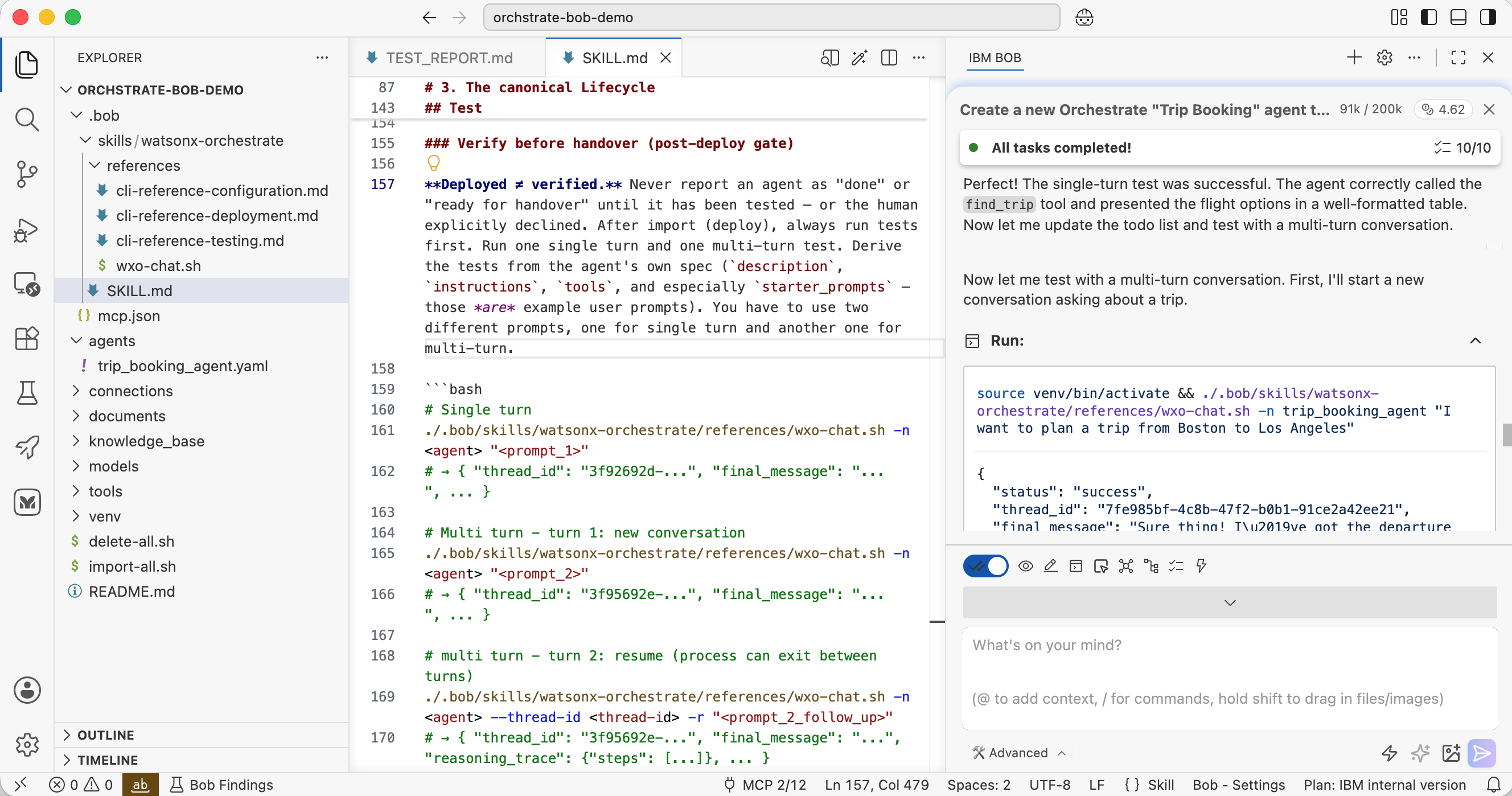
- Bob activates the skill and loads SKILL.md dynamically
- Bob installs the orchestrate CLI
- Bob generates the agent code
- Bob generates an import script and runs it
- Bob runs a single-turn conversation test
- Bob runs a multi-turn conversation test
1
2
3
4
5
6
7
8
9
10
11
12
13
14
15
16
17
18
19
20
21
22
23
24
25
26
27
28
29
30
31
32
33
34
35
36
37
38
39
40
41
42
43
44
45
46
47
48
49
50
51
52
53
54
55
56
57
58
59
60
61
62
63
64
65
66
67
68
69
70
71
72
73
74
75
76
77
78
79
80
81
82
83
84
85
86
87
88
89
90
91
92
93
94
95
96
97
98
99
100
101
102
103
104
105
106
107
108
109
110
111
112
113
114
115
116
117
118
119
120
121
122
123
124
125
126
127
128
129
130
131
132
133
134
135
136
137
138
139
140
141
142
143
144
145
146
147
148
149
150
151
152
153
154
155
156
157
158
159
160
161
162
163
164
165
166
167
168
169
170
171
172
173
174
175
176
177
178
**User:**

<task>
Create a new Orchestrate "Trip Booking" agent to book flights.

The agent uses a tool "Find Trip" that requires four input parameters:
1. destination airport
2. departure airport
3. start date
4. return date

The tool returns mocked data for now.
</task>

[...]

**Assistant:**

I'll help you create a new Orchestrate "Trip Booking" agent with a
"Find Trip" tool. Let me start by activating the watsonx-orchestrate skill
to get the necessary instructions.

<use_skill>
<name>watsonx-orchestrate</name>
</use_skill>

[...]

The 'orchestrate' CLI is not currently available in your environment. Let
me set up the Python virtual environment and install the CLI first.

<execute_command>
<command>for PY in python3.13 python3.12 python3.11; do command -v
"$PY" >/dev/null && break; done && [ -d venv ] || [ -d .venv ] || "$PY"
-m venv venv && (source venv/bin/activate 2>/dev/null ||
source .venv/bin/activate) && pip install
--upgrade "ibm-watsonx-orchestrate==2.10.0"</command>
</execute_command>

[...]

Great! The CLI is now installed.

[...]

Below is your current list of reminders for this task. Keep them updated
as you progress.

| # | Content | Status |
|---|---------|--------|
| 1 | Set up project structure | In Progress |
| 2 | Create the Find Trip tool with Python | Pending |
| 3 | Create the Trip Booking agent YAML | Pending |
| 4 | Create import and delete scripts | Pending |
| 5 | Bootstrap Python environment | Pending |
| 6 | Import the tool and agent | Pending |
| 7 | Test the agent with single-turn conversation | Pending |
| 8 | Test the agent with multi-turn conversation | Pending |
| 9 | Generate test report | Pending |

[...]

<execute_command>
<command>source venv/bin/activate 2>/dev/null || source .venv/bin/activate
&& bash import-all.sh</command>
</execute_command>

[...]

Output:
Starting import process for Trip Booking Agent...
Activating local environment...
[0;36m[INFO][0;0m - local tenant found
[0;36m[INFO][0;0m - Environment 'local' is now active
Cleaning up existing resources...
Deleting Trip Booking Agent resources...
Deleting agent: trip_booking_agent
Agent not found or already deleted
Deleting tool: find_trip
Tool not found or already deleted
All resources deleted successfully!

Importing resources...
Importing tool: find_trip
[0;36m[INFO][0;0m - Using requirement file: "tools/requirements.txt"
[0;36m[INFO][0;0m - Existing Tool 'find_trip' found. Updating...
[0;36m[INFO][0;0m - Tool 'find_trip' updated successfully
Importing agent: trip_booking_agent
[0;36m[INFO][0;0m - Agent 'trip_booking_agent' imported successfully

Import completed successfully!

[...]

**Assistant:**

<execute_command>
<command>source venv/bin/activate 2>/dev/null || source .venv/bin/activate
&& ./.bob/skills/watsonx-orchestrate/references/wxo-chat.sh
-n trip_booking_agent "Find me flights from ORD to LAX departing 2026-12-20
and returning 2026-12-27"</command>
</execute_command>

[...]

Output:
{
  "status": "success",
  "thread_id": "53506c72-f1a2-4c6f-abfa-661be1a1c609",
  "final_message": "Success! [...]",
  "reasoning_trace": null,
  "thinking_trace": [],
  "error": null
}

[...]

<execute_command>
<command>source venv/bin/activate 2>/dev/null || source .venv/bin/activate
&& ./.bob/skills/watsonx-orchestrate/references/wxo-chat.sh
-n trip_booking_agent "I need to fly from Atlanta to San Francisco"</command>
</execute_command>

[...]

Output:
{
  "status": "success",
  "thread_id": "f5aec41d-6f3a-4840-b46a-61d0437cecd7",
  "final_message": "Sure thing! I can help you find the perfect flight from
  **Atlanta (ATL)** to **San\u202fFrancisco (SFO)**.  \n\nCould you let me
  know:\n\n1. **Departure date** (when you\u2019d like to leave Atlanta)
  \n2. **Return date** (if you need a round\u2011trip)
  \nOnce I have those dates, I\u2019ll search for the best flight options
  for you. \ud83d\ude80",
  "reasoning_trace": null,
  "thinking_trace": [],
  "error": null
}

[...]

<execute_command>
<command>source venv/bin/activate 2>/dev/null || source .venv/bin/activate
&& ./.bob/skills/watsonx-orchestrate/references/wxo-chat.sh
-n trip_booking_agent --thread-id f5aec41d-6f3a-4840-b46a-61d0437cecd7 -r
"Departure January 15, 2027 and return January 22, 2027"</command>
</execute_command>

Output:
{
  "status": "success",
  "thread_id": "f5aec41d-6f3a-4840-b46a-61d0437cecd7",
  "final_message": "Success! [...]",
  "reasoning_trace": {
    "steps": [
      {
        "step": 1,
        "type": "tool_calls",
        "tool_calls": [
          {
            "tool": null,
            "arguments": null,
            "agent": "Trip Booking Agent"
          }
        ]
      },
      {
        "step": 2,
        "type": "tool_response",
        "tool_name": "find_trip",
        "tool_response": "[... see above ...]"}"
      }
    ]
  },
  "thinking_trace": [],
  "error": null
}
Skill
The skill contains instructions on how to create and test agents.
1
2
3
4
5
6
7
8
# The canonical Lifecycle

Follow this order. Dependencies must exist *before* the thing that references them.

scaffold project → Bootstrap an isolated virtual environment + CLI
   → write tools (+connections/models/KB) → write agent YAML
   → import connections → import models → import KB → import tools/toolkits
   → import agent → chat-test → debug → re-import → deploy
There are additional instructions on how to run the tests.
1
2
3
4
5
6
7
8
9
10
11
12
13
14
15
16
17
18
19
20
21
22
23
### Verify before handover (post-deploy gate)

**Deployed ≠ verified.** Never report an agent as "done" or "ready for
handover" until it has been tested . After import (deploy), always run
tests first. Run one single turn and one multi-turn test. Derive the tests
from the agent's own spec ('description', 'instructions', 'tools', and
especially 'starter_prompts' — those *are* example user prompts). You have
to use two different prompts, one for single turn and another one for
multi-turn.

'''bash
# Single turn
./.bob/skills/watsonx-orchestrate/references/wxo-chat.sh -n <agent> "<prompt_1>"
# → { "thread_id": "3f92692d-...", "final_message": "...", ... }

# Multi turn - turn 1: new conversation
./.bob/skills/watsonx-orchestrate/references/wxo-chat.sh -n <agent> "<prompt_2>"
# → { "thread_id": "3f95692e-...", "final_message": "...", ... }

# multi turn - turn 2: resume (process can exit between turns)
./.bob/skills/watsonx-orchestrate/references/wxo-chat.sh -n <agent> --thread-id <thread-id> -r "<prompt_2_follow_up>"
# → { "thread_id": "3f95692e-...", "final_message": "...", "reasoning_trace": {"steps": [...]}, ... }
'''
Chat Script
When skills are activated, only the content from SKILL.md is loaded into the context. Other markdown documents can be referenced and loaded on demand later.
Skills can also contain scripts or other code. This content is usually not loaded into the context; instead, it is executed directly by the agent. To run single- and multi-turn conversations, I asked Bob to generate a script that utilizes the watsonx Orchestrate REST APIs.
1
2
3
4
5
6
7
8
9
10
11
12
13
14
15
16
17
18
19
20
21
22
23
24
25
26
27
28
29
30
31
32
33
34
35
36
37
38
39
40
41
42
43
44
45
#!/usr/bin/env bash
# wxo-chat.sh — Programmatic single-turn and multi-turn chat with a watsonx Orchestrate agent
#
# Reads credentials and the active environment from the Developer Edition config at:
#   ~/.config/orchestrate/config.yaml     (active env, wxo_url)
#   ~/.cache/orchestrate/credentials.yaml (wxo_mcsp_token)
#
# Usage:
#   Single-turn (new thread):
#     ./wxo-chat.sh -n <agent-name> "Your message"
#
#   Multi-turn (continue existing thread):
#     ./wxo-chat.sh -n <agent-name> --thread-id <UUID> "Your follow-up"
#
#   With reasoning trace:
#     ./wxo-chat.sh -n <agent-name> -r "Your message"
#
#   Override active environment:
#     ./wxo-chat.sh -n <agent-name> -e local "Your message"
#
# Output (JSON, always to stdout):
#   {
#     "status":          "success" | "error",
#     "thread_id":       "<UUID>",
#     "final_message":   "...",
#     "reasoning_trace": { "steps": [...] },
#     "thinking_trace":  ["..."],
#     "error":           null
#   }
#
# thread_id: save this value and pass it back via --thread-id to continue
#            the conversation from any process at any point in time.

[...]

curl -sf \
  -X POST \
  -H "Authorization: Bearer ${TOKEN}" \
  -H "Content-Type: application/json" \
  -d "@${RUN_PAYLOAD_FILE}" \
  "${RUNS_ENDPOINT}" \
  -o "$RUN_RESPONSE_FILE" \
  || die "Failed to create run at ${RUNS_ENDPOINT}"

[...]
Next Steps
To find out more, check out the following resources: