
IBM Bob is a generic AI-based software development tool which can be customized for specific scenarios. This post describes how Bob can utilize the ‘orchestrate’ CLI to access IBM watsonx Orchestrate environments via an agentic skill.
Customizations of Bob can be done in several different ways: Skills, MCP tools, custom modes, Agents.md, rules and commands. These alternatives support different features and have pros and cons. One question that is often raised is when to use tools vs skills with instructions to run CLIs (command line interfaces/terminal commands).
As an experiment and to learn more about this topic, I’ve taken the watsonx Orchestrate ADK MCP Server and reimplemented it via a skill and the ‘orchestrate’ CLI.
Benefits
Large Language Models are good in running terminal commands since CLIs have been around for a long time. MCP tools have only come up rather recently which is why fewer examples are in the training data. Agents like Bob might be better in using the CLI directly.
The existing MCP tool requires manual installation of the ‘orchestrate’ CLI. The watson-orchestrate skill contains instructions how to do this automatically.
Sometimes AI-based development agents lose connectivity to MCP servers which are running in separate processes, e.g. via uvx.
Usually, CLIs are updated with every new release since they are adopted heavily and required for automation like CI/CD. MCP servers are sometimes updated later or don’t contain all features from the CLIs.
Skill
My colleague Florin Manaila created a great watsonx Orchestrate skill. The current version on GitHub is just a small subset of it which I adopted to demonstrate the use case below.
Note that this version is optimized for the local Orchestrate Developer Environment and it uses the ADK version 2.0.10 only.
Example Flow
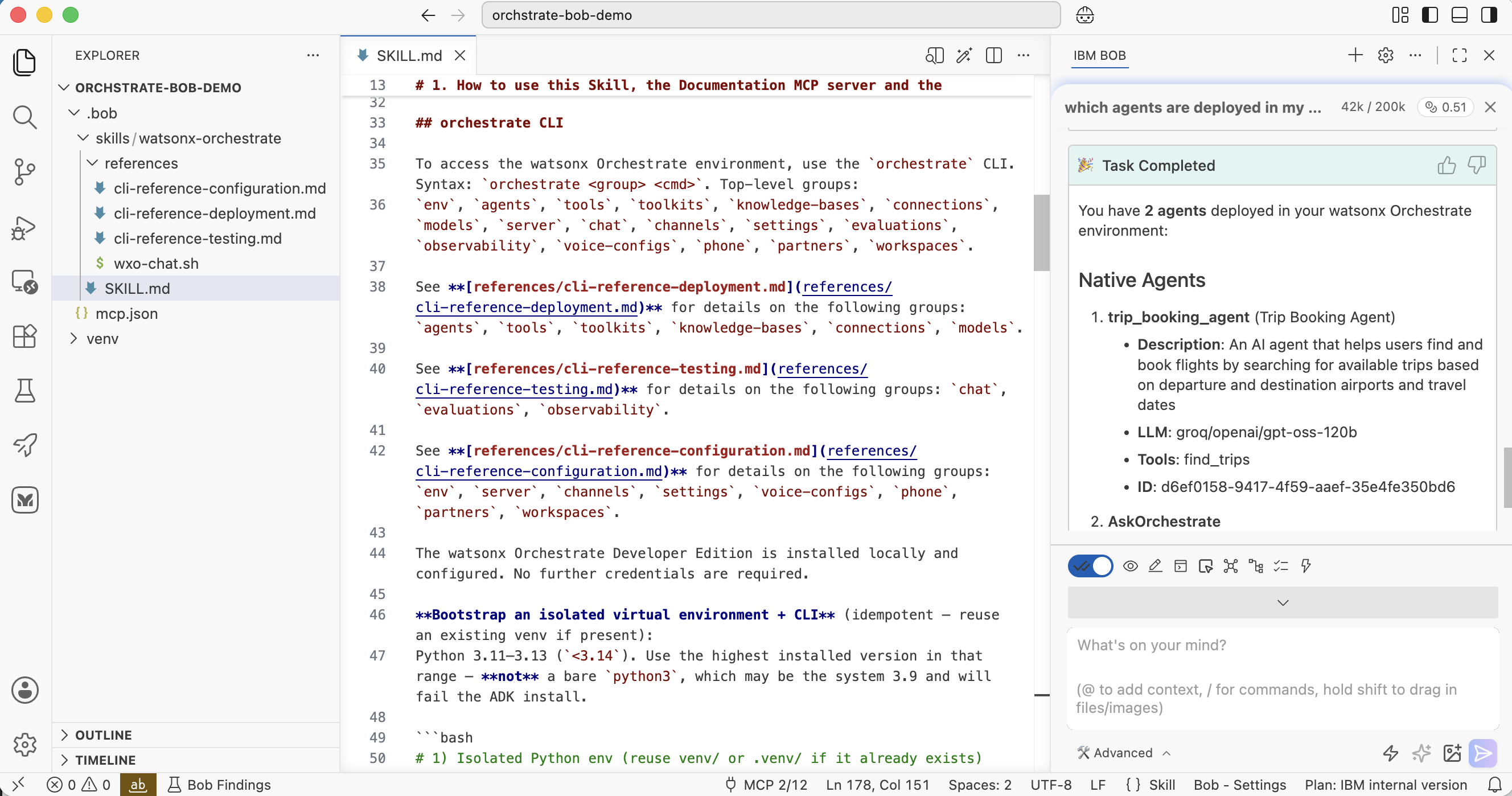
Let’s look at an example:
- Bob activates the skill and loads SKILL.md dynamically
- Bob installs the orchestrate CLI
- Bob loads additionally instructions from references/cli-reference-deployment.md dynamically
- Bob invokes orchestrate CLI commands
1
2
3
4
5
6
7
8
9
10
11
12
13
14
15
16
17
18
19
20
21
22
23
24
25
26
27
28
29
30
31
32
33
34
35
36
37
38
39
40
41
42
43
44
45
46
47
48
49
50
51
52
53
54
55
56
57
58
59
60
61
62
63
64
65
66
67
68
69
70
71
72
73
74
75
76
77
**User:**

<task>
which agents are deployed in my Orchestrate environment?
</task>

[...]

**Assistant:**

I'll help you check which agents are deployed in your watsonx Orchestrate
environment. Let me use the watsonx Orchestrate skill to access this
information.

<use_skill>
<name>watsonx-orchestrate</name>
</use_skill>

[...]

The 'orchestrate' CLI is not currently available in your environment. Let
me set up the Python virtual environment and install the CLI first.

<execute_command>
<command>for PY in python3.13 python3.12 python3.11; do command -v
"$PY" >/dev/null && break; done && [ -d venv ] || [ -d .venv ] || "$PY"
-m venv venv && (source venv/bin/activate 2>/dev/null ||
source .venv/bin/activate) && pip install
--upgrade "ibm-watsonx-orchestrate==2.10.0"</command>
</execute_command>

[...]

Great! The CLI is now installed.

[...]

I'll explain which agents are deployed the watsonx Orchestrate CLI. Let me
read the deployment reference documentation for complete details.

<read_file>
<args>
  <file>
    <path>.bob/skills/watsonx-orchestrate/references/cli-reference-deployment.md</path>
  </file>
</args>
</read_file>

[...]

Now let me check which agents are deployed in your Orchestrate environment:

<execute_command>
<command>source venv/bin/activate && orchestrate agents list</command>
</execute_command>

[...]
                                     Agents
┏━━━━━━━━┳━━━━━━━━┳━━━━━━━━┳━━━━━━━━┳━━━━━━━━┳━━━━━━━┳━━━━━━━━┳━━━━━━━┳━━━━━━━━┓
┃        ┃        ┃        ┃        ┃        ┃       ┃        ┃ Know… ┃        ┃
┃ Name   ┃ Descr… ┃ LLM    ┃ Style  ┃ Colla… ┃ Tools ┃ Plugi… ┃ Base  ┃ ID     ┃
┡━━━━━━━━╇━━━━━━━━╇━━━━━━━━╇━━━━━━━━╇━━━━━━━━╇━━━━━━━╇━━━━━━━━╇━━━━━━━╇━━━━━━━━┩
│ trip_b │ An AI  │ groq/o │ defau… │        │ find… │        │       │ d6ef01 │
│ ooking │ agent  │ penai/ │        │        │       │        │       │ 58-941 │
│ _agent │ that   │ gpt-os │        │        │       │        │       │ 7-4f59 │
│  (Trip │ helps  │ s-120b │        │        │       │        │       │ -aaef- │
│ Bookin │ users  │        │        │        │       │        │       │ 35e4fe │
│ g      │ find   │        │        │        │       │        │       │ 350bd6 │
│ Agent) │ .....  │        │        │        │       │        │       │        │
├────────┼────────┼────────┼────────┼────────┼───────┼────────┼───────┼────────┤
│ AskOrc │ A      │ groq/o │ defau… │        │       │        │       │ ddb6d4 │
│ hestra │ helpf… │ penai/ │        │        │       │        │       │ 2b-a32 │
│ te     │ AI     │ gpt-os │        │        │       │        │       │ c-4abb │
│        │ assis… │ s-120b │        │        │       │        │       │ -83d7- │
│        │        │        │        │        │       │        │       │ e8b825 │
│        │        │        │        │        │       │        │       │ 4264c0 │
└────────┴────────┴────────┴────────┴────────┴───────┴────────┴───────┴────────┘
Instructions
The instructions how to use the CLI are part of the skill:
- SKILL.md
- cli-reference-deployment.md
- cli-reference-testing.md
- cli-reference-configuration.md
I’ve broken down the CLI documentation in the four files above to avoid having to load everything in the context directly. SKILL.md contains references to the other three documents so that they can be loaded later.
I’ve grouped the instructions in three categories. It might make even more sense to have for each ‘orchestrate group’ a separate markdown document. Additionally, SKILL.md could contain the most typical commands directly ensuring extra markdown documents are only loaded when specific, less-frequent information is required.
1
2
3
4
5
6
7
8
9
10
11
12
13
14
15
16
17
18
19
20
21
22
23
24
25
26
27
28
29
30
31
32
33
34
35
36
## orchestrate CLI

To access the watsonx Orchestrate environment, use the 'orchestrate' CLI.
Syntax: 'orchestrate <group> <cmd>'. Top-level groups:
'env', 'agents', 'tools', 'toolkits', 'knowledge-bases', 'connections',
'models', 'server', 'chat', 'channels', 'settings', 'evaluations',
'observability', 'voice-configs', 'phone', 'partners', 'workspaces'.

See **[references/cli-reference-deployment.md](references/cli-reference-deployment.md)**
for details on the following groups: 'agents', 'tools', 'toolkits',
'knowledge-bases', 'connections', 'models'.

See **[references/cli-reference-testing.md](references/cli-reference-testing.md)**
for details on the following groups: 'chat', 'evaluations', 'observability'.

See **[references/cli-reference-configuration.md](references/cli-reference-configuration.md)**
for details on the following groups: 'env', 'server', 'channels', 'settings',
'voice-configs', 'phone', 'partners', 'workspaces'.

The watsonx Orchestrate Developer Edition is installed locally and configured.
No further credentials are required.

**Bootstrap an isolated virtual environment + CLI** (idempotent — reuse an
existing venv if present):
Python 3.11–3.13 ('<3.14'). Use the highest installed version in that range —
**not** a bare 'python3', which may be the system 3.9 and will fail the
ADK install.

# 1) Isolated Python env (reuse venv/ or .venv/ if it already exists)
for PY in python3.13 python3.12 python3.11; do command -v "$PY" >/dev/null
&& break; done [ -d venv ] || [ -d .venv ] || "$PY" -m venv venv
source venv/bin/activate 2>/dev/null || source .venv/bin/activate

# 2) Install the CLI if missing.
orchestrate --version 2>/dev/null || pip install --upgrade
"ibm-watsonx-orchestrate==2.10.0"
CLI Documentation
To generate the CLI documentation above, I’ve used a simple prompt.
The ‘orchestrate’ CLI code is available as open-source as well as the code of the MCP server.
1
2
3
4
5
6
7
8
9
10
11
12
13
14
Create a markdown file which can be used in an agentic skill to describe the
'orchestrate' CLI.

The implementation is in the 'cli' folder.
The 'mcp_server' folder contains a MCP server with the same functionality
that you can read to better understand how the CLI works.

Read 'cli' and 'mcp_server' to understand the functionality of the CLI.
The generated markdown file needs to contain exact documentation how to use
the CLI so that agents like IBM Bob, Claude Code and Codex can understand
and execute it.

Create an implementation plan first before you start with the generation of
the markdown file.
Next Steps
To find out more, check out the following resources: