
IBM Bob is an AI SDLC (Software Development Lifecycle) partner that augments your existing workflows and helps you work confidently with real codebases. Bob can be extended via skills, MCP tools, custom modes and more, for example for the development of agents running in watsonx Orchestrate MCP tools can be leveraged. This post explains a skill to find out issues of agents running locally.
AI-based software development tools like Bob can not only generate code but support other development aspects. I like especially the capabilities to find out what and why something doesn’t work. A couple of years ago developers often ran the following workflow when errors occurred.
- Copy error and invoke Google searches
- Find StackOverflow pages and open them
- Verify that StackOverflow page is about the same error
- Find the accepted solution on that page
- Understand the solution and apply it manually into your code
- Test your modified code
This workflow took a long time and required a lot of cognitive work. Today with tools like Bob you can simply enter prompts like “Fix error in @Terminal” which run the workflow more or less automatically.
Debug Skill
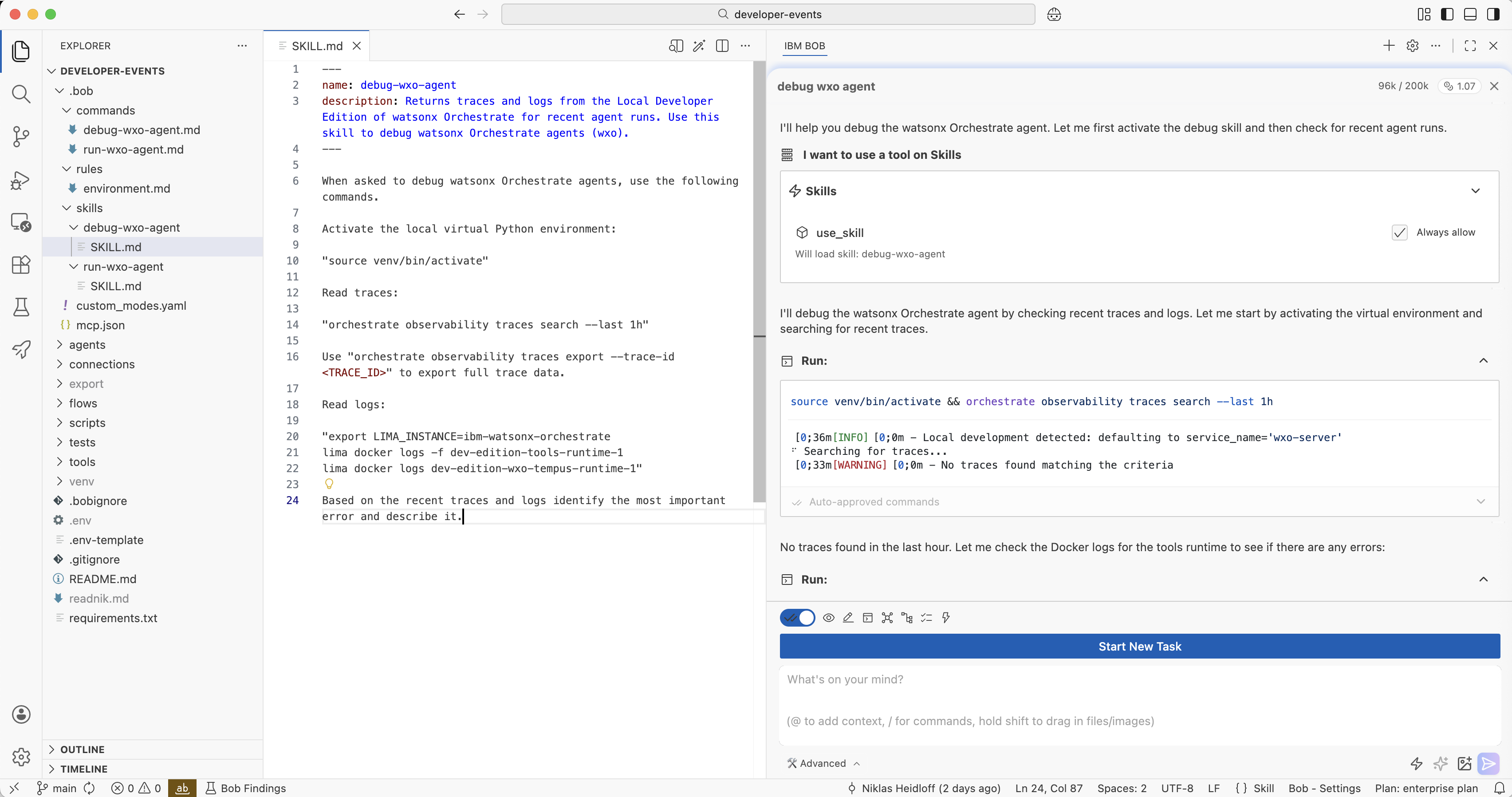
To identify and fix errors with watsonx Orchestrate agents running locally, I’ve created a custom debug skill in addition to the two MCP Tools.
Via the ‘orchestrate’ CLI and the virtual environment Bob can connect to the local Orchestrate Developer Edition. It reads the logs of certain containers and combines this data with the traces. As a result, Bob summarizes recent issues and suggests next steps.
1
2
3
4
5
6
7
8
9
10
11
12
13
14
15
16
17
18
19
20
21
22
23
24
25
26
27
28
---
name: debug-wxo-agent
description: Returns traces and logs from the Local Developer Edition of watsonx
             Orchestrate for recent agent runs. Use this skill to debug watsonx
            Orchestrate agents (wxo).
---

When asked to debug watsonx Orchestrate agents, use the following commands.

Activate the local virtual Python environment:

"source venv/bin/activate"

Read traces:

"orchestrate observability traces search --last 1h"

Use "orchestrate observability traces export --trace-id <TRACE_ID>" to export
full trace data for the most recent trace.

Read logs:

"export LIMA_INSTANCE=ibm-watsonx-orchestrate
lima docker logs -f dev-edition-tools-runtime-1
lima docker logs dev-edition-wxo-tempus-runtime-1"

Based on the recent traces and logs identify the most important error,
describe it and suggest steps how to fix it.
Customization
The skill reads the logs from the tool container which executes custom Python tools and from the tempus runtime which executes agentic workflows. Dependent on your scenarios you might also want to add the logs of further Orchestrate containers.
1
2
3
orchestrate server ssh
niklasheidloff@lima-ibm-watsonx-orchestrate:/Users/niklasheidloff/Desktop$
docker ps --format "table "
Note: The skill only works in the ‘Advanced’ mode right now.
Next Steps
To find out more, check out the following resources: