
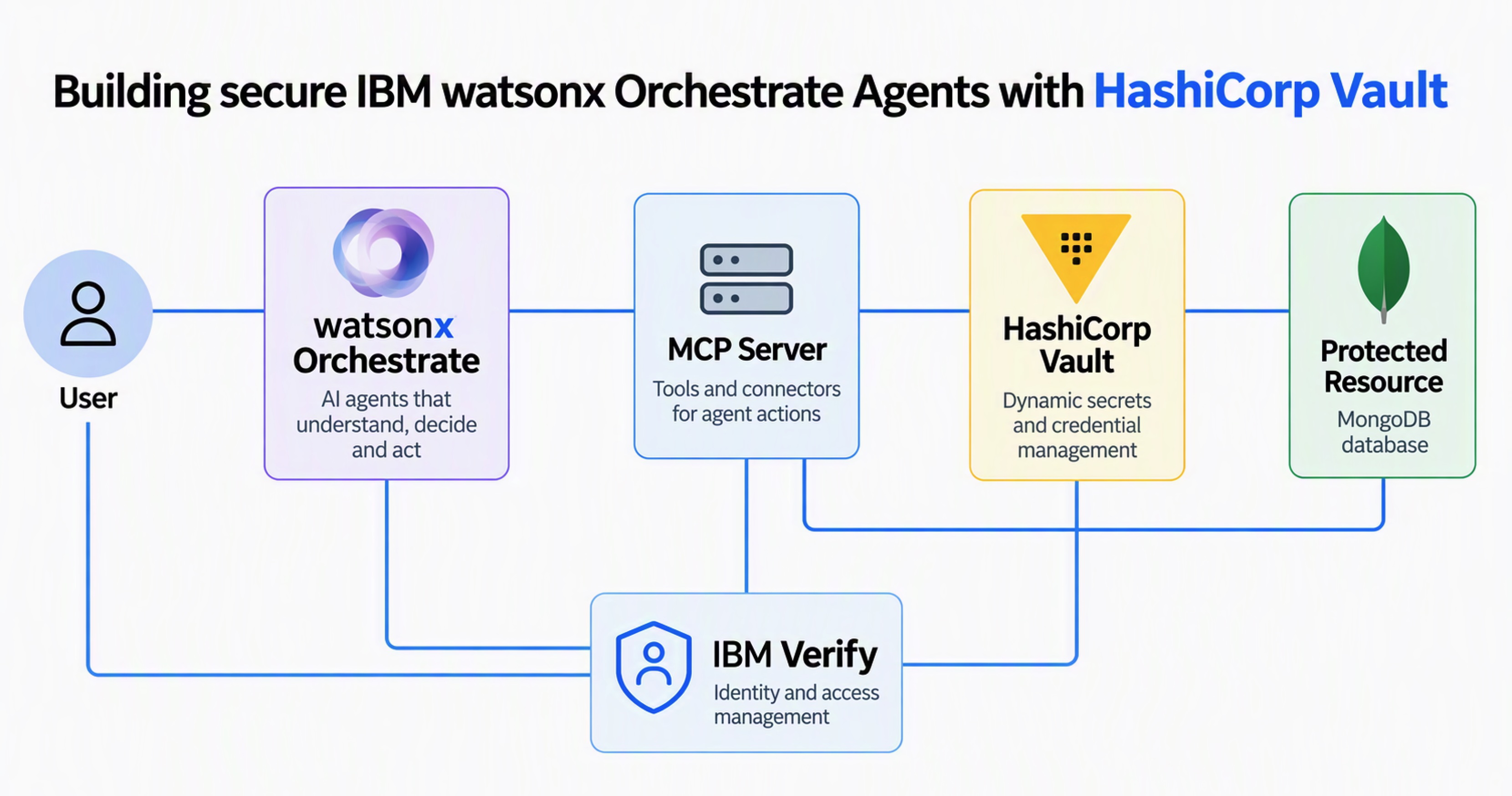
Autonomous AI agents are reshaping modern application architectures by acting on behalf of users, invoking APIs, and coordinating actions across trust boundaries with limited human supervision. This post explores how the agentic enterprise platform, IBM watsonx Orchestrate, addresses some of these security challenges using HashiCorp Vault.
Unlike traditional software, agents make real-time, probabilistic decisions and often rely on long-lived credentials or coarse-grained permissions. This shift exposes organizations to the ‘confused deputy problem’ where an agent with broad authority can be unintentionally manipulated, through prompt injection or mixed user contexts, into performing unauthorized actions outside the user’s original intent.
To address these vulnerabilities, AI agent security must be grounded in Zero Trust principles, moving away from static service accounts and implicit trust. By ensuring that agents possess verifiable identities, explicit delegation scopes, and short-lived, purpose-bound credentials, organizations can restrict an agent’s authority to specific tasks and contexts. This prevents the accumulation of standing privileges, limits the blast radius of any potential compromise, and maintains a clear, auditable chain of provenance for every action taken.
My colleagues previously wrote an article on this topic titled Secure AI agents with IBM watsonx Orchestrate, IBM Verify, and HashiCorp Vault, and I published a post covering the OAuth Token Exchange authentication technique. This post goes deeper into the mechanics how HashiCorp Vault works and how it can be accessed from a Model Context Protocol (MCP) server within the context of watsonx Orchestrate agents.
Architecture
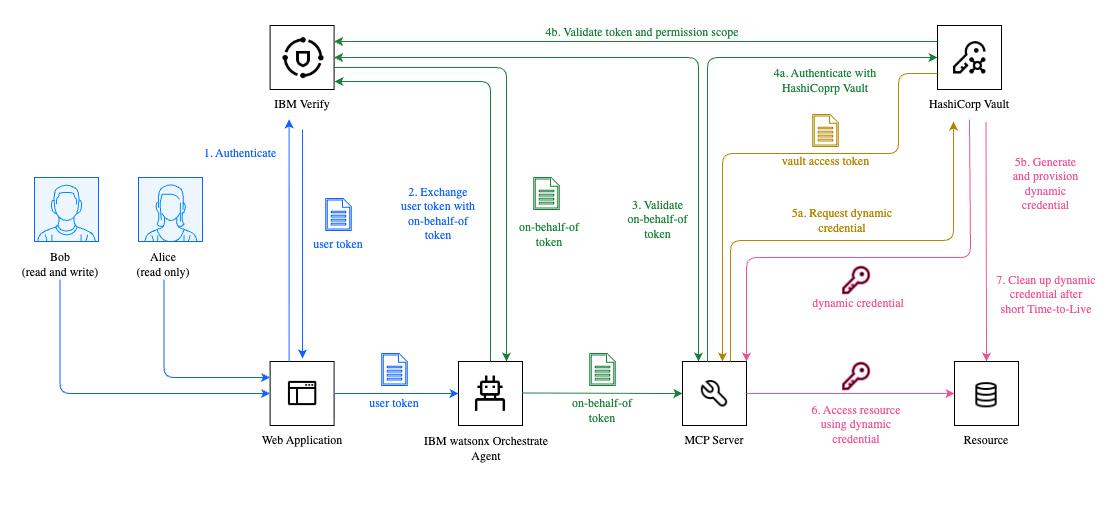
The following diagram outlines the system architecture. The MCP server needs to access data in a protected resource: a MongoDB database. The MCP receives the user context passed down from watsonx Orchestrate via OAuth Token Exchange.
Rather than reusing the raw bearer token acquired during direct invocation, the tool calls HashiCorp Vault, which returns a temporary token with the minimum necessary permissions (least privilege) for the specific user. That token is then leveraged to access MongoDB. To enable this flow, Vault must be configured specifically for MongoDB.
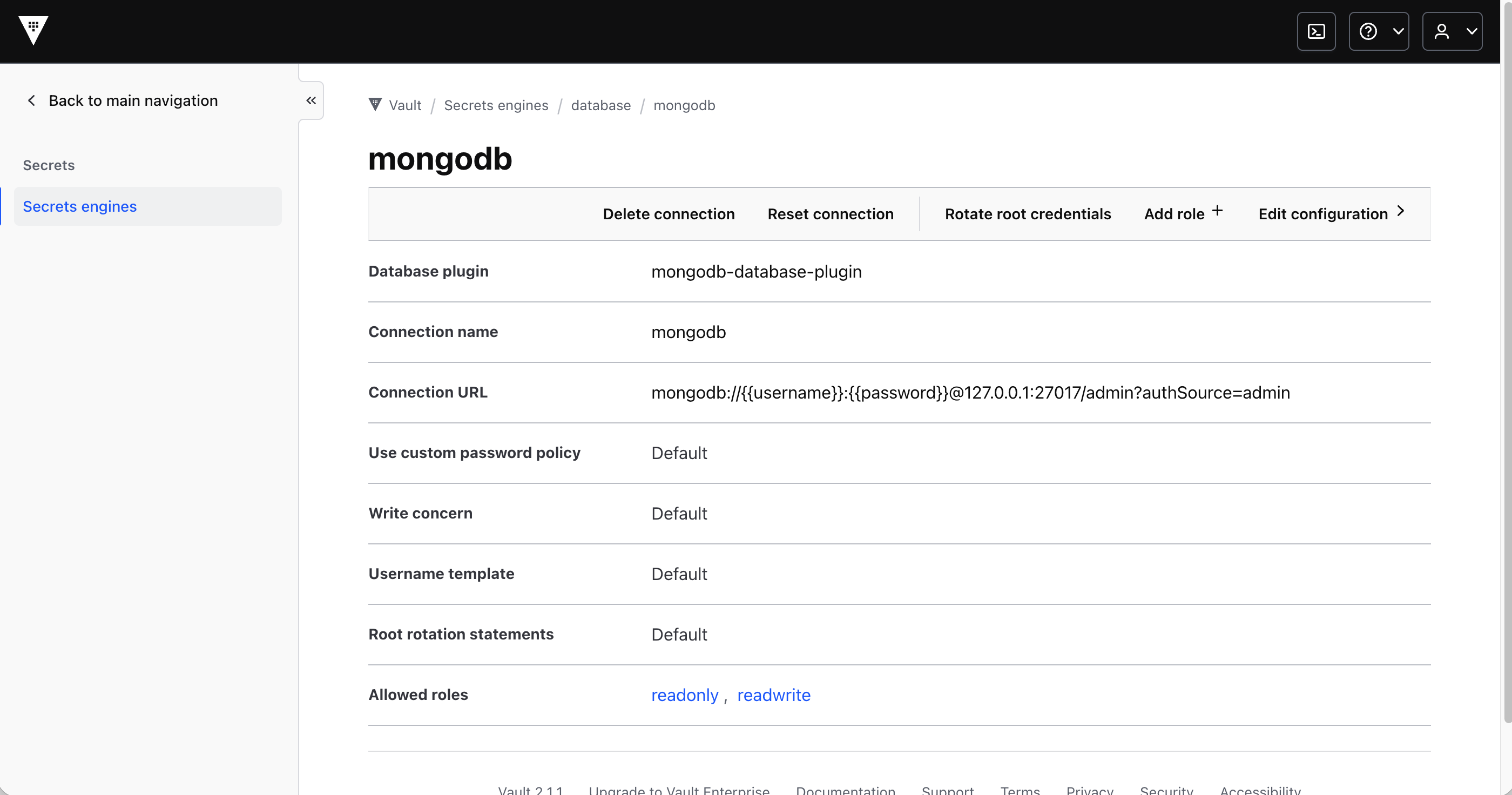
To enable this flow, Vault needs to be configured for MongoDB.
Example
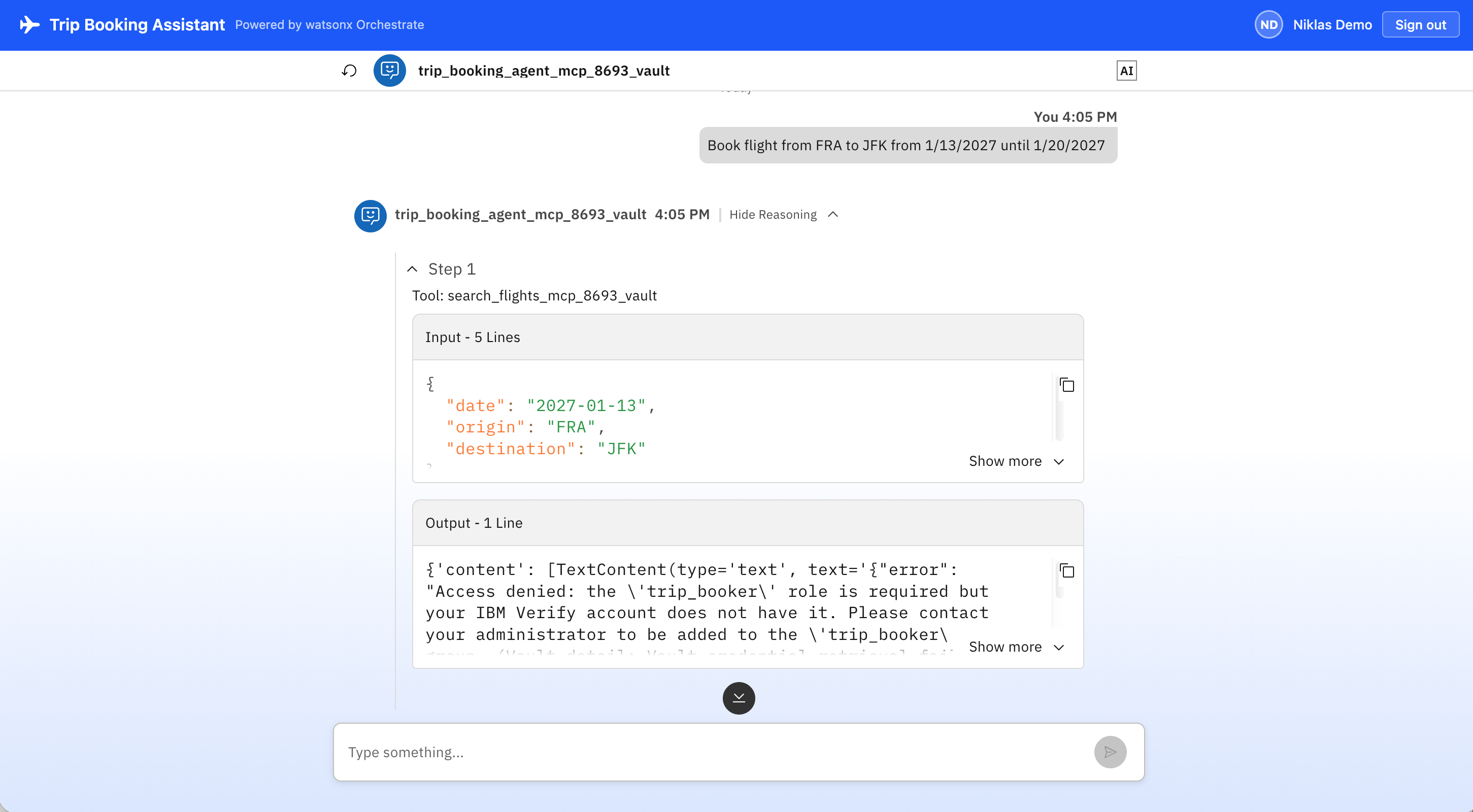
Below is a demonstration of a simple watsonx Orchestrate agent designed to book flights. Only authenticated users with a ‘trip_booker’ role are allowed to read flight records from the database.
Flow
To observe how HashiCorp Vault handles this in practice, you can use either the CLI (Command Line Interface) or the UI (User Interface).
Check the OIDC discovery URL Vault uses to verify IBM Verify JWTs:
1
2
3
4
5
6
7
vault read auth/jwt/config

Key                                     Value
---                                     -----
default_role                            n/a
oidc_discovery_url                      https://xxx.verify.ibm.com/oidc/endpoint/default
...
Inspect the ‘trip-booker-readonly’ JWT auth role:
1
2
3
4
5
6
7
8
9
vault read auth/jwt/role/trip-booker-readonly

Key                        Value
---                        -----
bound_audiences            [xxx-xxx-xxx-xxx-xxx]
bound_claims               map[groups:trip_booker]
token_policies             [readonly]
user_claim                 sub
...
Inspect the Vault policy that the role grants:
1
2
3
4
vault policy read readonly

path "database/creds/readonly" { capabilities = ["read"] }
path "database/roles"          { capabilities = ["list"] }
Inspect the Database Secrets Engine role:
1
2
3
4
5
6
7
8
9
vault read database/roles/readonly

Key                      Value
---                      -----
creation_statements      [{ "db": "admin", "roles": [{ "db": "flights", "role": "trip_booker_reader" }] }]
credential_type          password
db_name                  mongodb
default_ttl              1h
max_ttl                  24h
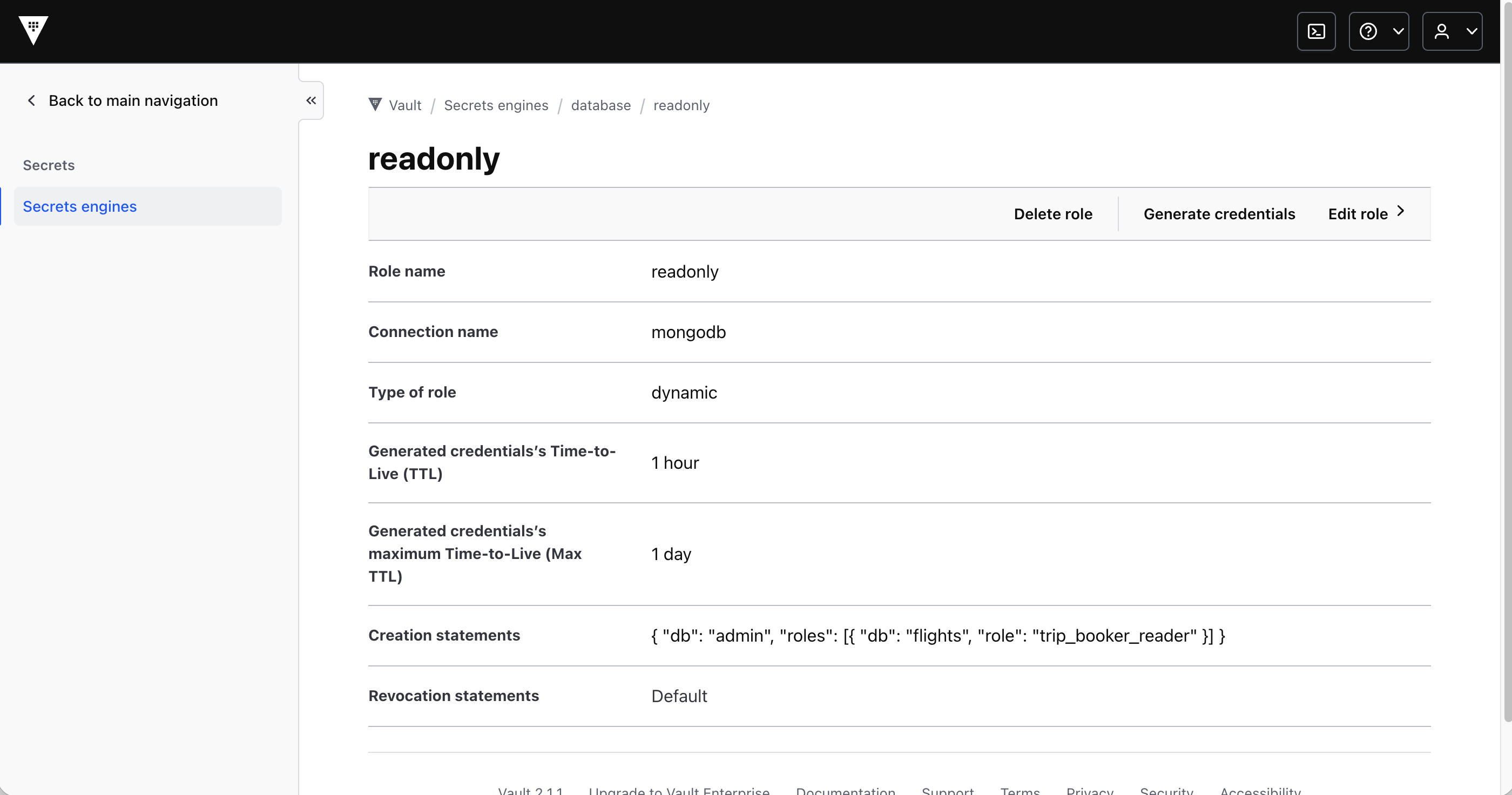
The same information is displayed in the user interface:
Confirm no active leases exist yet (before any tool call):
1
2
3
vault list sys/leases/lookup/database/creds/readonly

No value found at sys/leases/lookup/database/creds/readonly
As an authenticated user with the trip_booker role invokes the tool search_flights_mcp_8693_vault. Immediately after the tool call, check active leases:
1
2
3
4
5
vault list sys/leases/lookup/database/creds/readonly

Keys
----
database-mongodb-readonly-XXXXXXXX
Each entry is a short-lived dynamic MongoDB credential that was created for this tool invocation. It expires after one hour.
Inspect a specific lease to see its expiry:
1
2
3
4
5
6
7
8
9
10
vault lease lookup database/creds/readonly/<lease-id-from-above>

Key             Value
---             -----
expire_time     2026-10-07T13:25:00.365837739Z
id              database/creds/readonly/XXXXXXXX
issue_time      2026-10-07T12:25:00.36583748Z
last_renewal    <nil>
renewable       true
ttl             59m21s
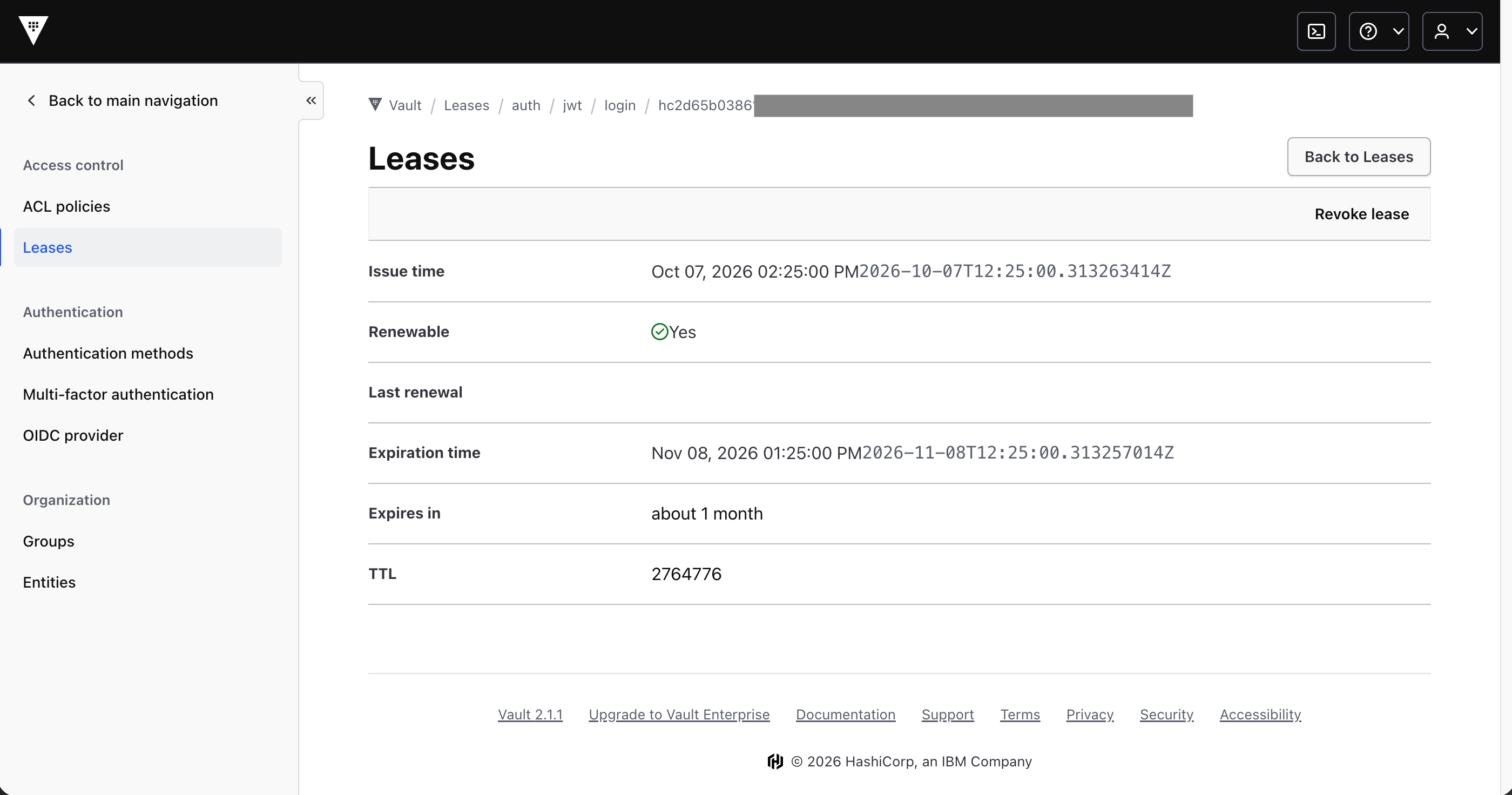
Again, the same information is displayed in the user interface:
What happened inside Vault during the tool call:
- MCP server called ‘jwt_login(role=”trip-booker-readonly”, jwt=
)'. - Vault verified the JWT signature via OIDC discovery, checked ‘aud’, checked ‘groups == “trip_booker”’ — all passed.
- Vault issued a short-lived token with policy ‘readonly’.
- MCP server called ‘generate_credentials(“readonly”)’ — Vault created a temporary MongoDB user with role ‘trip_booker_reader’ and returned the username/password.
- MCP server used those credentials to query ‘flights.flights’.
Code
Below are the key snippets of the MCP tool implementation.
1
2
3
4
5
6
7
8
9
10
11
12
13
14
15
16
17
18
19
20
21
22
23
24
25
26
27
28
29
30
31
32
33
34
35
36
37
38
39
40
41
42
43
44
45
46
47
48
49
50
51
52
53
54
55
56
57
58
59
60
61
62
63
64
65
66
67
68
69
70
71
72
73
74
75
76
77
78
79
80
81
82
83
84
85
86
87
88
89
90
91
92
93
94
95
96
97
98
99
100
101
102
103
104
105
106
107
108
109
110
111
112
113
114
115
"""
Flights MCP server — mcp_8693_vault variant (IBM Verify token-exchange + HashiCorp Vault dynamic MongoDB credentials).
"""
import asyncio
import json
import jwt as pyjwt
import uvicorn
from fastapi import FastAPI
from fastapi.responses import JSONResponse
from mcp.server.mcpserver import Context, MCPServer
from config import get_config
from vault_client import get_mongodb_credentials
from pymongo import MongoClient

...

def _verify_bearer(auth: str) -> dict:
    if not auth.startswith("Bearer "):
        raise PermissionError(
            "No Bearer token in Authorization header"
        )
    raw_token = auth[7:]

...

def query_flights_from_mongodb(
    creds: Dict[str, Any],
    origin: str,
    destination: str,
    date: str,
) -> List[Dict[str, Any]]:
    """
    Connect to MongoDB with dynamic credentials and query flight documents.
    """
    config = get_config()
    host = config.mongo_host or "127.0.0.1"
    port = config.mongo_port
    db_name = config.mongo_database
    username = creds["username"]
    password = creds["password"]

    uri = f"mongodb://{username}:{password}@{host}:{port}/{db_name}?authSource=admin"
    client = MongoClient(uri, serverSelectionTimeoutMS=5000)
    try:
        db = client[db_name]
        collection = db["flights"]
        query = {
            "origin": {"$regex": f"^{origin}$", "$options": "i"},
            "destination": {"$regex": f"^{destination}$", "$options": "i"},
        }
        if date:
            query["date"] = date
        docs = list(collection.find(query, {"_id": 0}))
        if not docs and date:
            fallback_query = {
                "origin": {"$regex": f"^{origin}$", "$options": "i"},
                "destination": {"$regex": f"^{destination}$", "$options": "i"},
            }
            docs = list(collection.find(fallback_query, {"_id": 0}))
        return docs
    finally:
        client.close()

...

mcp = MCPServer(config.server_name)

@mcp.tool(structured_output=False)
async def search_flights_mcp_8693_vault(
    origin: str,
    destination: str,
    date: str,
    ctx: Context,
) -> str:
    """Search for available flights between two cities on a given date by reading from MongoDB
    using dynamic, least-privileged credentials issued by HashiCorp Vault.
    Uses IBM Verify token-exchange (oauth_auth_token_exchange_flow); requires
    the caller to hold the trip_booker role in their IBM Verify JWT.
    Args:
        origin: Departure IATA code or city (e.g. FRA or JFK).
        destination: Arrival IATA code or city (e.g. JFK or BOS).
        date: Travel date YYYY-MM-DD."""
    auth = _get_auth_header(ctx)
    try:
        claims = _verify_bearer(auth)
        sub = _read_sub(claims)
        # Note: Here you could also check the role of the user
        # For demo purposes it's not done here, but in the underlaying Vault/MongoDB layer
    except PermissionError as exc:
        return str(exc)

    raw_token = auth[7:] if auth.startswith("Bearer ") else ""

    try:
        # Request dynamic readonly MongoDB credentials from Vault
        creds = get_mongodb_credentials(jwt_token=raw_token, operation="read")
        flights = query_flights_from_mongodb(
            creds=creds,
            origin=origin,
            destination=destination,
            date=date,
        )
        return json.dumps(flights)
    except Exception as exc:
        exc_str = str(exc)
        if "groups" in exc_str and "missing" in exc_str:
            return json.dumps({
                "error": (
                    f"Access denied: the 'trip_booker' role is required but your IBM Verify "
                    f"account does not have it. Please contact your administrator to be added "
                    f"to the 'trip_booker' group. (Vault detail: {exc_str})"
                )
            })
        return json.dumps({"error": exc_str})
...
Next Steps
To find out more, check out the following resources: