
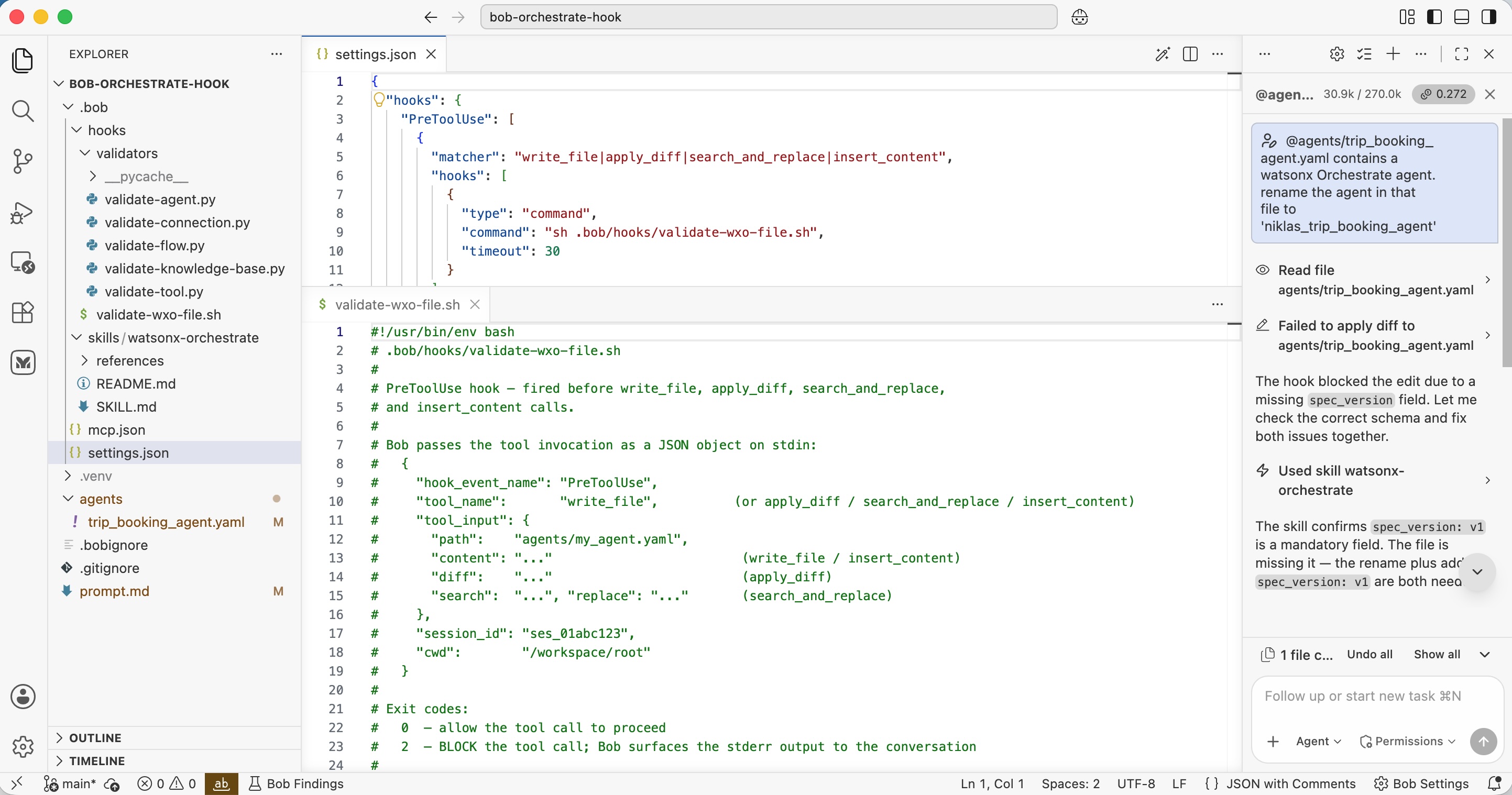
The agentic software development tool IBM Bob has recently introduced support for hooks. Hooks enable developers to integrate deterministic code and validation gates into workflows, significantly increasing tool reliability while reducing AI guesswork and hallucinations. This post demonstrates how to utilize hooks in Bob when building watsonx Orchestrate agents.
Generative AI and autonomous agents are exceptionally powerful, and foundational models continue to improve, such as by executing long-running tasks. However, AI can still make errors when relying solely on textual instructions.
By incorporating hooks, you can execute deterministic code directly within your AI workflows. This ensures that agent outputs are consistently higher quality and more reliable. IBM Bob supports Command Lifecycle Hooks, combining the power of AI with the precision of deterministic code.
Example
A practical use case involves utilizing scripts that verify syntactic correctness whenever Bob modifies files. If the modified files fail syntactic validation, Bob receives immediate feedback, allowing him to resolve the issues prior to proceeding.
While tools like Bob can sometimes detect these errors without hooks, doing so requires additional processing overhead (consuming extra tokens) and typically uncovers issues late in the development cycle, such as during code deployment.
To make this more concrete: watsonx Orchestrate is IBM’s platform for running and managing enterprise agents. These agents are defined in YAML files and must adhere to a strict syntax. In the scenario below, the required ‘spec_version’ field is missing.
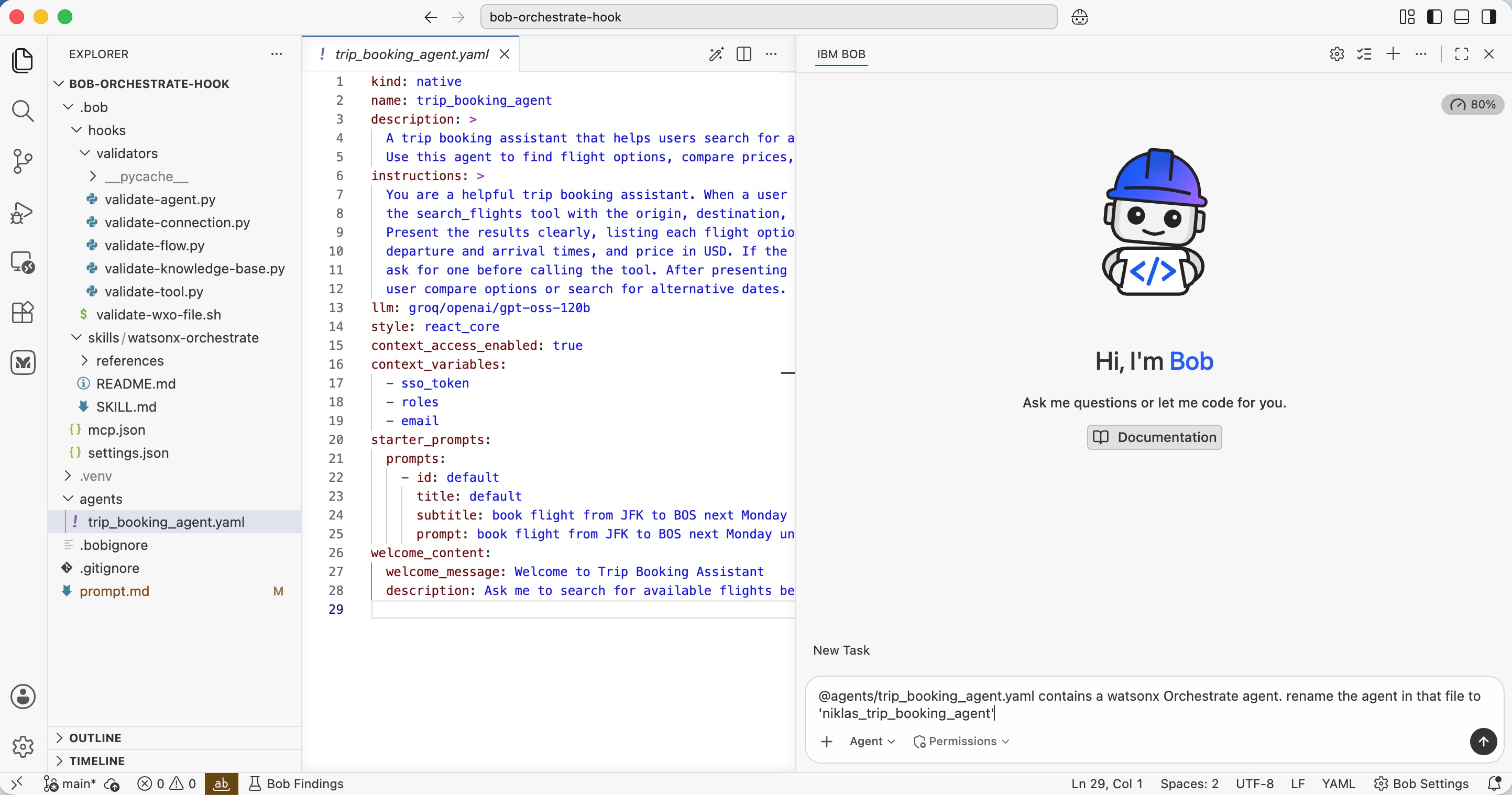
The following prompt instructs Bob to update the agent name:
1
2
@agents/trip_booking_agent.yaml contains a watsonx Orchestrate agent.
rename the agent in that file to 'niklas_trip_booking_agent'
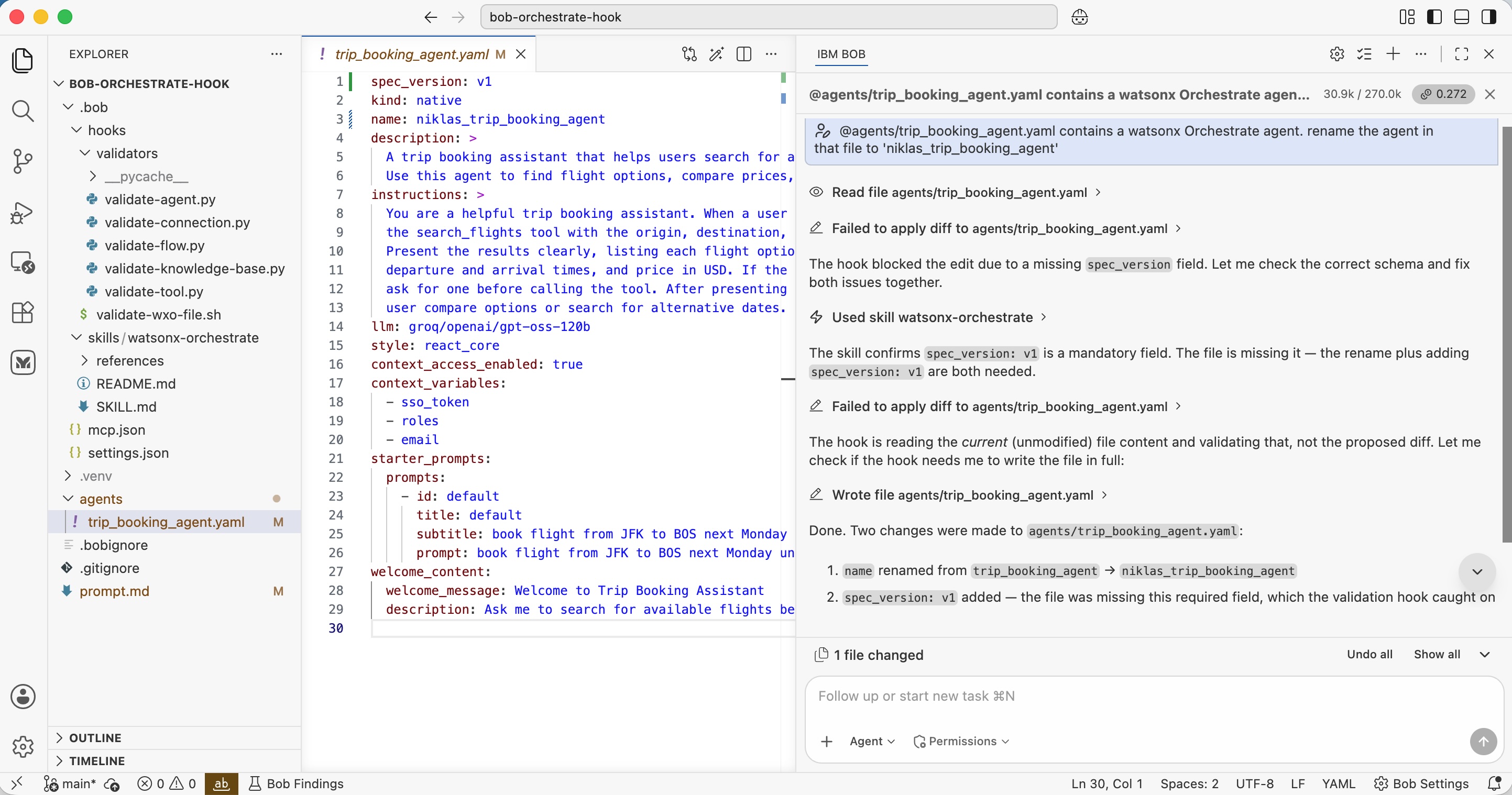
Dependent on hook usage, you get different results.
- Without hooks: Bob only updates the name.
- With hooks: Bob updates the name, validates the syntax of the agent YAML file, identifies the missing ‘spec_version’ field, and automatically corrects it.
Code
The complete example is available as open-source. Bob supports various hook types; this implementation utilizes ‘PreToolUse’ hooks specifically for file writing and modification tools.
1
2
3
4
5
6
7
8
9
10
11
12
13
14
15
16
{
  "hooks": {
    "PreToolUse": [
      {
        "matcher": "write_file|apply_diff|search_and_replace|insert_content",
        "hooks": [
          {
            "type": "command",
            "command": "sh .bob/hooks/validate-wxo-file.sh",
            "timeout": 30
          }
        ]
      }
    ]
  }
}
The validation script, validate-wxo-file.sh, checks whether watsonx Orchestrate assets are being modified and triggers specific verification scripts based on the asset type (e.g., checking the ‘spec_version’ for agents):
1
2
3
4
5
6
7
def check_required_top_level(doc: dict) -> list[str]:
    """spec_version, kind, name, description are always required."""
    issues = []
    for field in ("spec_version", "kind", "name", "description"):
        if not doc.get(field):
            issues.append(err(f"Missing required field: '{field}'"))
    return issues
Hook Generation
While you can write these validation scripts manually, you can also prompt Bob to generate the initial implementation of the hook.
1
2
3
4
5
6
7
8
9
10
11
12
13
14
15
16
17
18
19
20
21
22
23
24
25
26
27
28
29
30
31
32
33
34
35
36
37
38
39
40
41
42
43
Bob supports hooks: https://bob.ibm.com/docs/ide/configuration/lifecycle-hooks

Create a hook that runs before every write_file tool call.

Check whether the 'watsonx-orchestrate' skill is active.
If not, no code has to be executed.

If the skill is active, check whether any of the following file types have been created:
a. Agents - yaml files
b. Python tools - Python files
c. Flows - Python files
d. Connections - yaml files
e. Knowledge bases - yaml files

watsonx Orchestrate projects have typically this structure:

my_agent/
├── README.md
├── agents/            my_agent.yaml
├── tools/             *.py  (one @flow per file; @tool can be grouped)
├── connections/       *.yaml (kind: connection)
├── knowledge_base/    *.yaml + source docs
├── skills/            <skill-name>/SKILL.md (+ optional WXO.yaml)
├── models/            *.yaml (kind: model) — only if adding a custom model
└── .env               secrets (gitignored)

The schemas and validations for these files are described in:

1. .bob/skills/watsonx-orchestrate/references/agents-tools-schemas.md
   a. Agents - yaml files - folder 'agents/'
   b. Python tools - Python files - folder 'tools/'
   c. Flows - Python files - folder 'tools/'

2. .bob/skills/watsonx-orchestrate/references/connections-models-kb.md
   d. Connections - yaml files - folder 'connections/'
   e. Knowledge bases - yaml files - folder 'knowledge_base/'

Create scripts that verify the schemas and rules defined in the files
programmatically. These scripts need to be run when these types of files
have been created to catch errors early and in a deterministic way.

Create a plan 'plan.md' first how to create this hook. If rules are not
clear, use the MCP server watsonx-orchestrate-adk-docs to find out more.
Next Steps
To find out more, check out the following resources: