
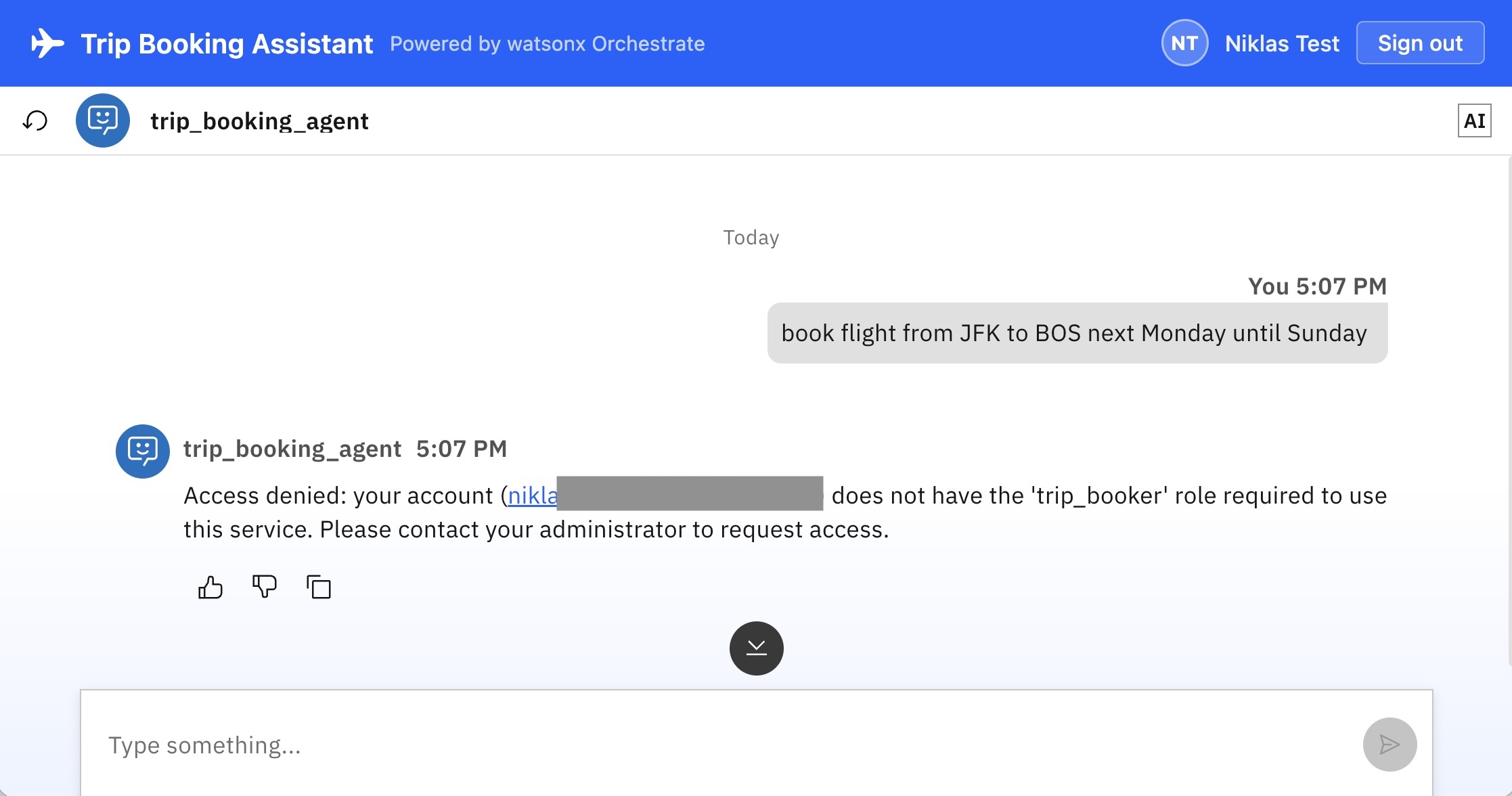
When deploying agents to enterprise AI platforms like IBM watsonx Orchestrate, robust user authentication and authorization are foundational requirements. Agents must operate securely on behalf of users, ensuring they can only access authorized external systems and tools. This article outlines how to implement Role-Based Access Control (RBAC) for your agents and tools.
Supported by IBM Bob, I have developed an open-source example application to demonstrate this implementation.
Read the following resources for details:
RBAC
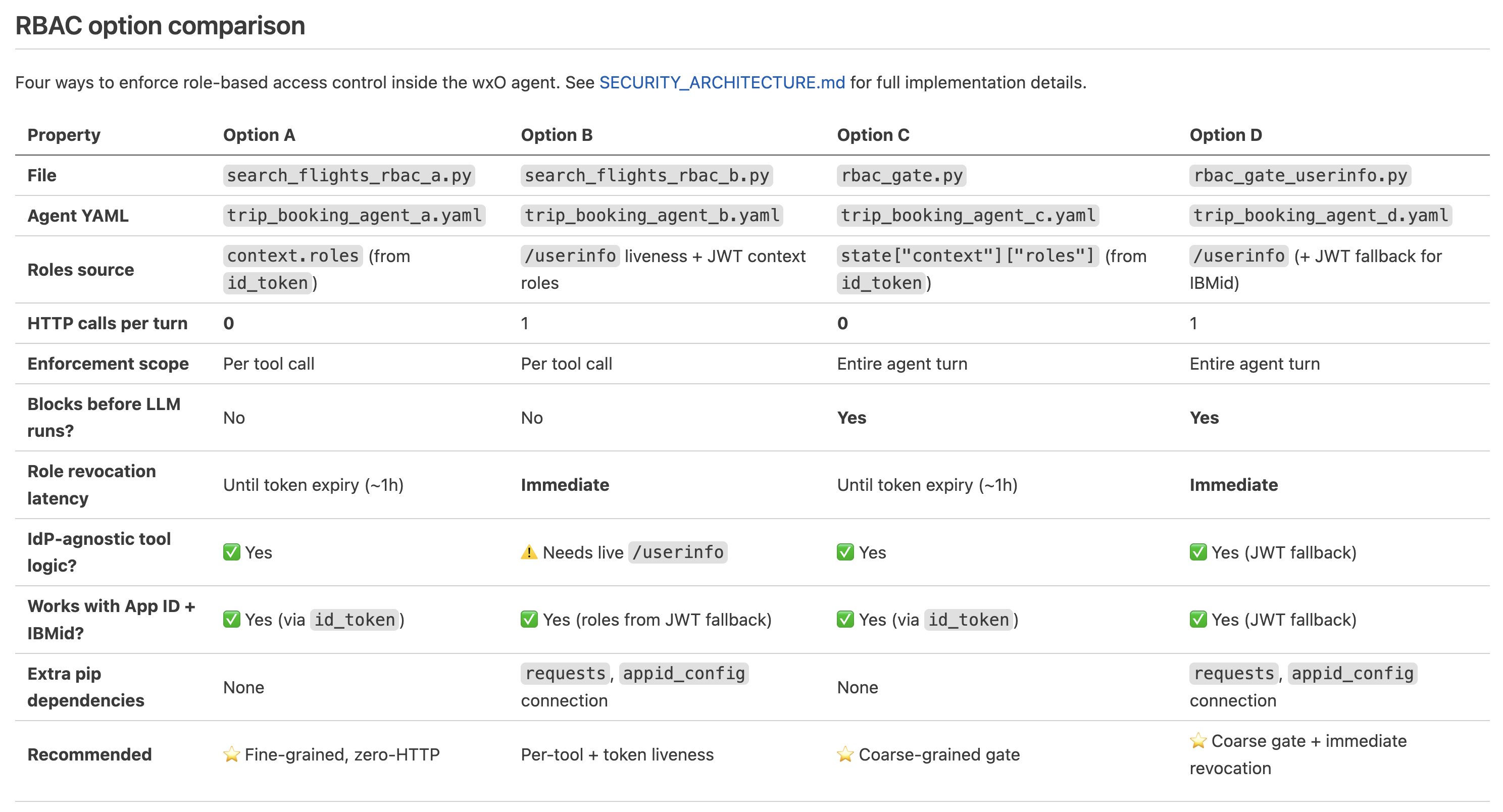
After users have been authenticated, authorization checks can be done via RBAC (Role Based Access Control). Roles can be assigned in Identity and Access Management (IAM) platforms like IBM App ID, Microsoft Entra and Okta. For example in IBM App ID:
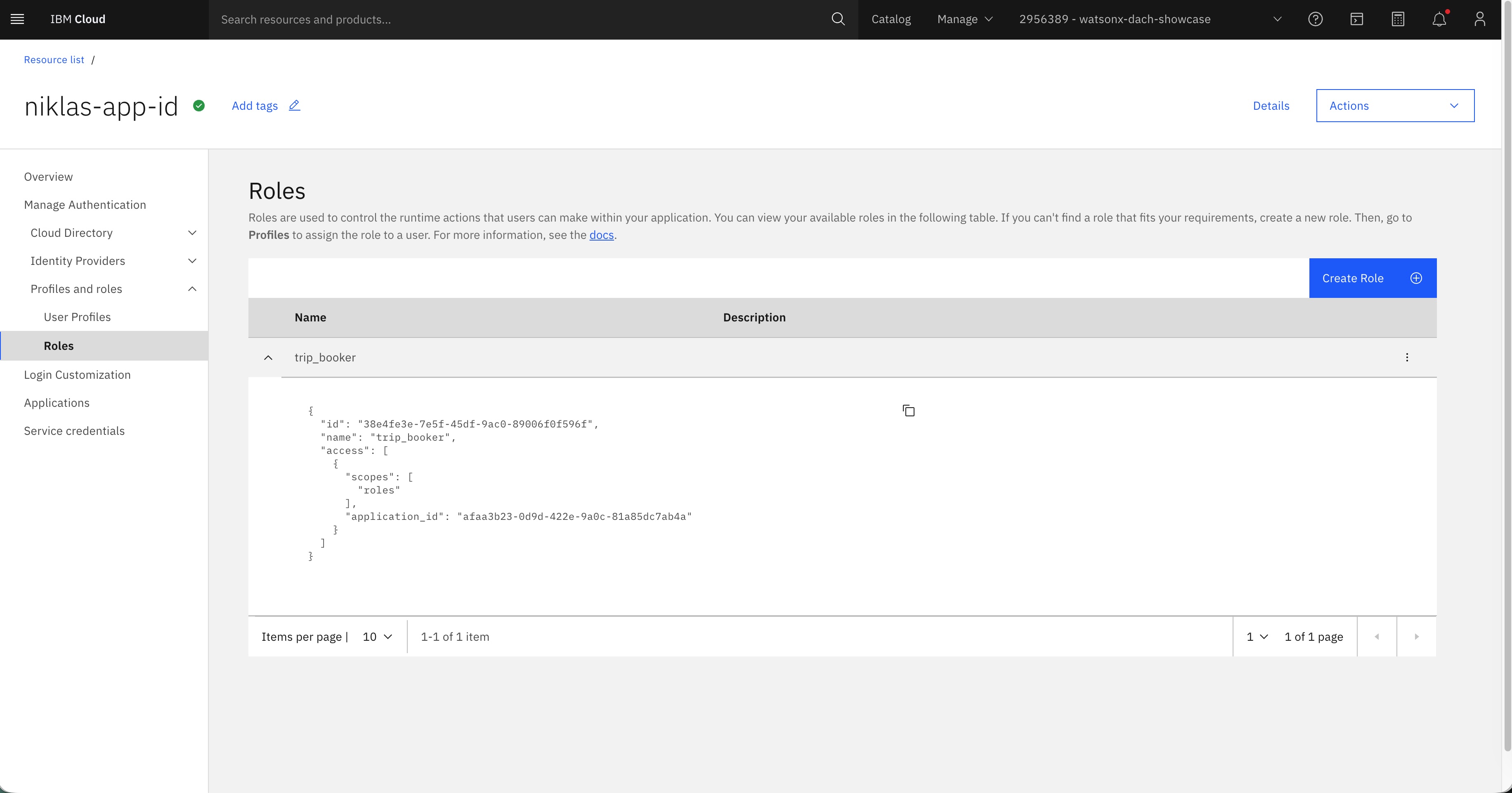
Options
Once authenticated, authorization checks can be executed via RBAC. Roles are assigned within Identity and Access Management (IAM) platforms such as IBM App ID, Microsoft Entra, or Okta.
Tools can verify a user’s authentication status using two primary mechanisms:
- JWT Validation: Relying on claims within a JSON Web Token (JWT) signed with the Orchestrate private key.
- Endpoint Verification: Invoking the Identity Provider’s /userinfo endpoint to verify identity and fetch the latest assigned roles.
Authorization enforcement can be applied at two distinct architectural levels:
- Tool Level: Directly inside individual tools during execution.
- Agent Level: Before tools and models are invoked, using agent pre-invoke plugins.
Bob has documented four different options how to implement RBAC.
Option A
The first option reads user roles directly from the signed JWT token passed into the request context and performs authorization checks inside the tool.
Note: The following example only checks the permission. You should only run this code for debugging purposes in a separate tool. Autonomous agents cannot guarantee that the permission-checking tool will always be invoked prior to executing sensitive actions. Instead put the same check inside the sensitive tool itself.
1
2
3
4
5
6
7
8
9
10
11
12
13
14
15
16
17
18
19
20
21
22
23
24
25
26
27
28
29
30
31
32
33
34
35
36
37
38
39
40
41
42
43
44
45
46
47
48
49
50
51
52
53
54
55
"""
RBAC Option A — read roles from the wxO JWT context (no HTTP call).
"""
from pydantic import BaseModel
from ibm_watsonx_orchestrate.agent_builder.tools import tool
from ibm_watsonx_orchestrate.run.context import AgentRun

REQUIRED_ROLE = "trip_booker"

class PermissionResult(BaseModel):
    allowed: bool
    subject: str
    roles: list[str]
    message: str

@tool()
def check_booking_permission(context: AgentRun) -> PermissionResult:
    """
    Check whether the logged-in user has the 'trip_booker' role.

    Reads the roles list injected into the wxO JWT context by the Express
    backend (sourced from the OIDC id_token).  No HTTP call is made.

    Call this tool in an agentic workflow before performing any booking action to enforce role-based
    access control.  If the user does not have the required role the tool raises
    a PermissionError and the agent will explain that they are not authorised.

    Args:
        context (AgentRun): Injected agent-run context containing roles and sso_token.

    Returns:
        PermissionResult: Authorisation verdict including the user's roles.
    """
    roles: list[str] = context.request_context.get("roles", [])

    subject = (
        context.request_context.get("sub", "")
        or context.request_context.get("email", "unknown")
    )

    if REQUIRED_ROLE not in roles:
        raise PermissionError(
            f"Access denied: '{subject}' does not have the '{REQUIRED_ROLE}' role. "
            f"Current roles: {roles}"
        )

    return PermissionResult(
        allowed=True,
        subject=subject,
        roles=roles,
        message=(
            f"'{subject}' is authorised to book trips "
            f"(roles: {', '.join(roles)})."
        )
    )
Option B
This approach applies authorization at the tool level while issuing a callback to the App ID service. This guarantees that recently updated role modifications are accounted for immediately.
1
2
3
4
5
6
7
8
9
10
11
12
13
14
15
16
17
18
19
20
21
22
23
24
25
26
27
28
29
30
31
32
33
34
35
36
37
38
39
40
41
42
43
44
45
46
47
48
49
50
51
52
53
54
55
56
57
58
59
60
61
62
63
64
65
66
67
68
69
70
71
72
73
74
75
76
77
78
79
80
81
82
83
84
85
86
87
88
89
90
91
92
93
94
95
96
97
98
99
100
101
102
103
104
105
106
107
108
109
110
111
112
113
114
115
116
117
118
119
120
"""
RBAC Option B — return the user's full profile AND enforce the 'trip_booker' role.
"""

import requests
from pydantic import BaseModel
from ibm_watsonx_orchestrate.agent_builder.tools import tool
from ibm_watsonx_orchestrate.run.context import AgentRun

APPID_ISSUER = (
    "https://eu-de.appid.cloud.ibm.com/oauth/v4/"
    "xxx"
)
APP_ID_USERINFO_URL = f"{APPID_ISSUER}/userinfo"
APP_ID_JWKS_URL     = f"{APPID_ISSUER}/publickeys"

VERIFY_TOKEN = False
REQUIRED_ROLE = "trip_booker"

class UserProfile(BaseModel):
    sub: str
    name: str
    email: str
    given_name: str
    family_name: str
    roles: list[str]    # from JWT context (id_token), NOT from /userinfo
    authorised: bool    # True if user carries REQUIRED_ROLE


def _verify_signature(token: str) -> dict:
    """
    Verify the App ID access token signature against the JWKS endpoint.
    Requires:  pip install PyJWT>=2 cryptography
    """
    try:
        import jwt as pyjwt
        from jwt import PyJWKClient
    except ImportError as exc:
        raise RuntimeError(
            "PyJWT and cryptography must be installed to use VERIFY_TOKEN=True.\n"
            "Add `PyJWT>=2` and `cryptography` to requirements.txt."
        ) from exc

    jwks_client = PyJWKClient(APP_ID_JWKS_URL, cache_keys=True)
    signing_key = jwks_client.get_signing_key_from_jwt(token)
    return pyjwt.decode(
        token,
        signing_key.key,
        algorithms=["RS256"],
        issuer=APPID_ISSUER,
        options={"verify_aud": False},
    )

@tool()
def get_user_profile_with_roles(context: AgentRun) -> UserProfile:
    """
    Retrieve the currently logged-in user's full profile AND enforce the
    'trip_booker' role.

    Roles are read from the JWT context (injected by the Express backend from
    the OIDC id_token at login) — no extra HTTP call for roles.
    The App ID /userinfo endpoint is called to fetch fresh profile fields only.
    Optionally verifies the sso_token RS256 signature via JWKS first.

    Use this tool when a user asks about their identity, profile, or
    permissions — or before performing any action that requires authorisation.

    Args:
        context (AgentRun): Injected agent-run context containing sso_token and roles.

    Returns:
        UserProfile: Profile fields plus roles list and authorised flag.
    """
    token = context.request_context.get("sso_token", "")
    if not token:
        raise ValueError(
            "No sso_token in context — please log in via the web app first."
        )

    roles: list[str] = context.request_context.get("roles", [])

    if VERIFY_TOKEN:
        try:
            _verify_signature(token)
        except Exception as e:
            raise ValueError(f"Token signature verification failed: {e}") from e

    try:
        resp = requests.get(
            APP_ID_USERINFO_URL,
            headers={
                "Authorization": f"Bearer {token}",
                "Accept": "application/json",
            },
            timeout=10,
        )
        resp.raise_for_status()
        data = resp.json()
    except Exception as e:
        raise RuntimeError(f"/userinfo call failed: {e}") from e

    subject = data.get("sub", "unknown")
    authorised = REQUIRED_ROLE in roles

    if not authorised:
        raise PermissionError(
            f"User '{subject}' does not have the '{REQUIRED_ROLE}' role "
            f"required for booking.  "
            f"Assigned roles: {roles or ['(none)']}"
        )

    return UserProfile(
        sub=subject,
        name=data.get("name", data.get("email", "")),
        email=data.get("email", ""),
        given_name=data.get("given_name", ""),
        family_name=data.get("family_name", ""),
        roles=roles,
        authorised=authorised,
    )
Option C
This option ensures authorization checks occur before any tools are invoked or language models are executed. This is accomplished using dedicated AGENTPREINVOKE plugins.
1
2
3
4
5
6
7
8
9
10
11
12
13
14
15
16
17
18
19
20
21
22
23
24
25
26
27
28
29
30
31
32
33
34
35
36
37
38
39
40
41
42
43
44
45
46
47
48
49
50
51
52
53
54
55
56
57
58
59
60
61
62
63
64
65
66
67
68
69
70
71
72
73
74
75
76
77
78
"""
RBAC Option C — AgentPreInvoke plugin.
"""

from ibm_watsonx_orchestrate.agent_builder.tools import tool
from ibm_watsonx_orchestrate.agent_builder.tools.types import (
    PythonToolKind,
    PluginContext,
    AgentPreInvokePayload,
    AgentPreInvokeResult,
)

REQUIRED_ROLE = "trip_booker"

def _deny(payload: AgentPreInvokePayload, description: str) -> AgentPreInvokeResult:
    """
    Return a blocking result whose message text is shown to the user.

    Rewrites the last user message text to `description`, then sets
    continue_processing=False.  wxO surfaces the rewritten text as the
    agent's response — the LLM is never invoked.

    Passing None or a plain string as modified_payload causes wxO to fall
    back to its generic "Plugin execution failed" error, so we always pass a
    valid AgentPreInvokePayload object.
    """
    result = AgentPreInvokeResult()
    result.continue_processing = False

    if payload and payload.messages:
        payload.messages[-1].content.text = description
    result.modified_payload = payload
    return result


@tool(description="Pre-invoke RBAC gate: blocks the agent if the user lacks the required role.",
    kind=PythonToolKind.AGENTPREINVOKE)
def rbac_gate(
    plugin_context: PluginContext,
    agent_pre_invoke_payload: AgentPreInvokePayload,
) -> AgentPreInvokeResult:
    """
    Reads `roles` from the JWT context_variables.  No HTTP call is made.
    Rewrites the user message to a refusal string and sets
    continue_processing=False when the required role is absent.

    Args:
        plugin_context (PluginContext): Runtime context.
            plugin_context.state is a plain dict — use .get("context", {}).
        agent_pre_invoke_payload (AgentPreInvokePayload): Incoming messages
            payload; passed through unchanged on success.

    Returns:
        AgentPreInvokeResult: blocking result with rewritten message text,
            or pass-through with continue_processing=True.
    """
    ctx: dict = {}
    if plugin_context and plugin_context.state:
        ctx = plugin_context.state.get("context", {}) or {}

    if not ctx and agent_pre_invoke_payload and agent_pre_invoke_payload.context:
        ctx = agent_pre_invoke_payload.context or {}

    roles: list = ctx.get("roles", [])
    subject: str = ctx.get("email", ctx.get("wxo_email_id", ctx.get("sub", "unknown")))

    if REQUIRED_ROLE not in roles:
        return _deny(
            agent_pre_invoke_payload,
            f"Access denied: your account ({subject}) does not have the "
            f"'{REQUIRED_ROLE}' role required to use this service. "
            f"Please contact your administrator to request access.",
        )

    result = AgentPreInvokeResult()
    result.continue_processing = True
    result.modified_payload = agent_pre_invoke_payload
    return result
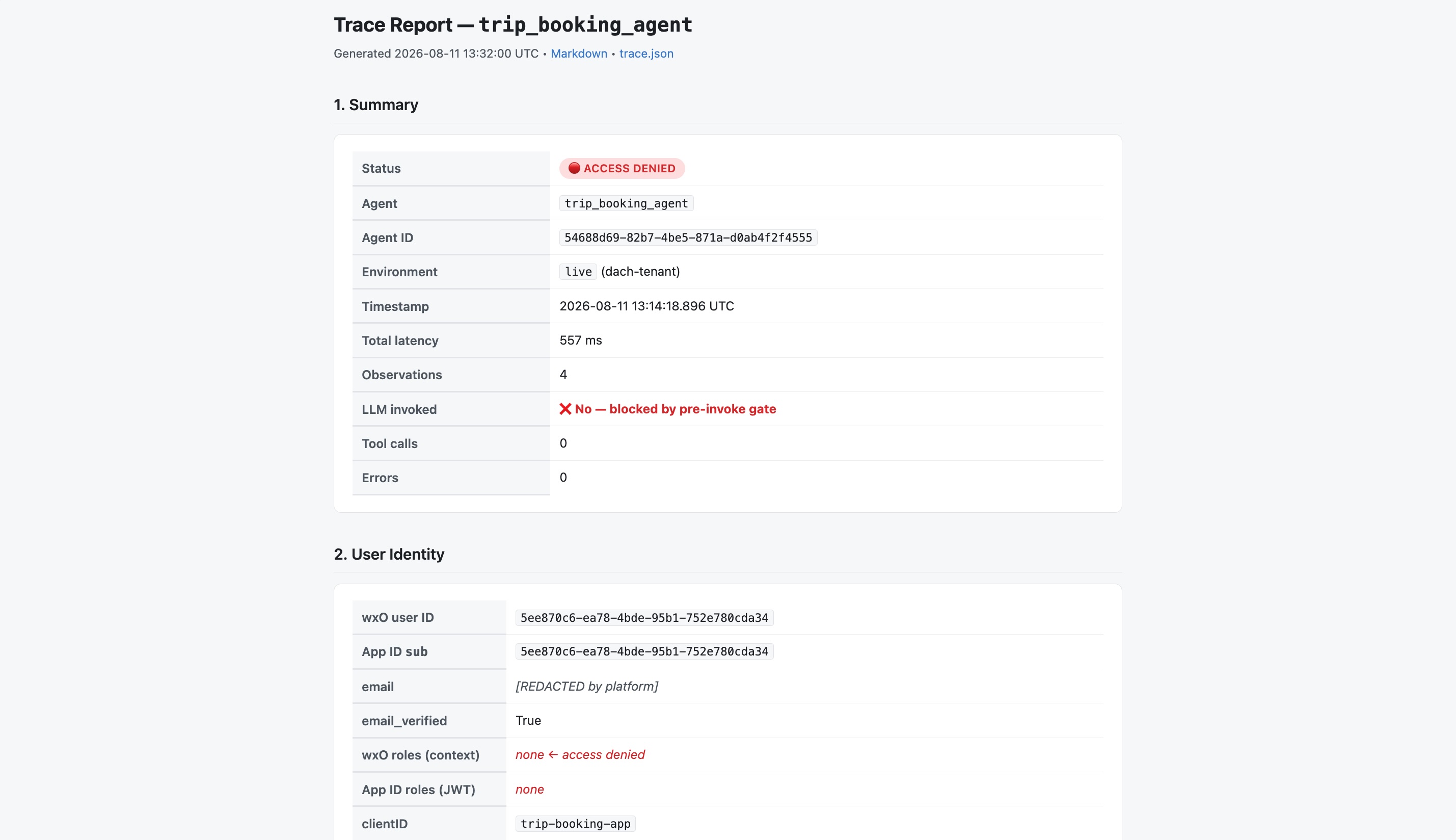
To see the traces you can run the following command which creates a HTML report.
1
2
cd trip_booking
./read-last-conversation.sh
Next Steps
To find out more, check out the following resources: