
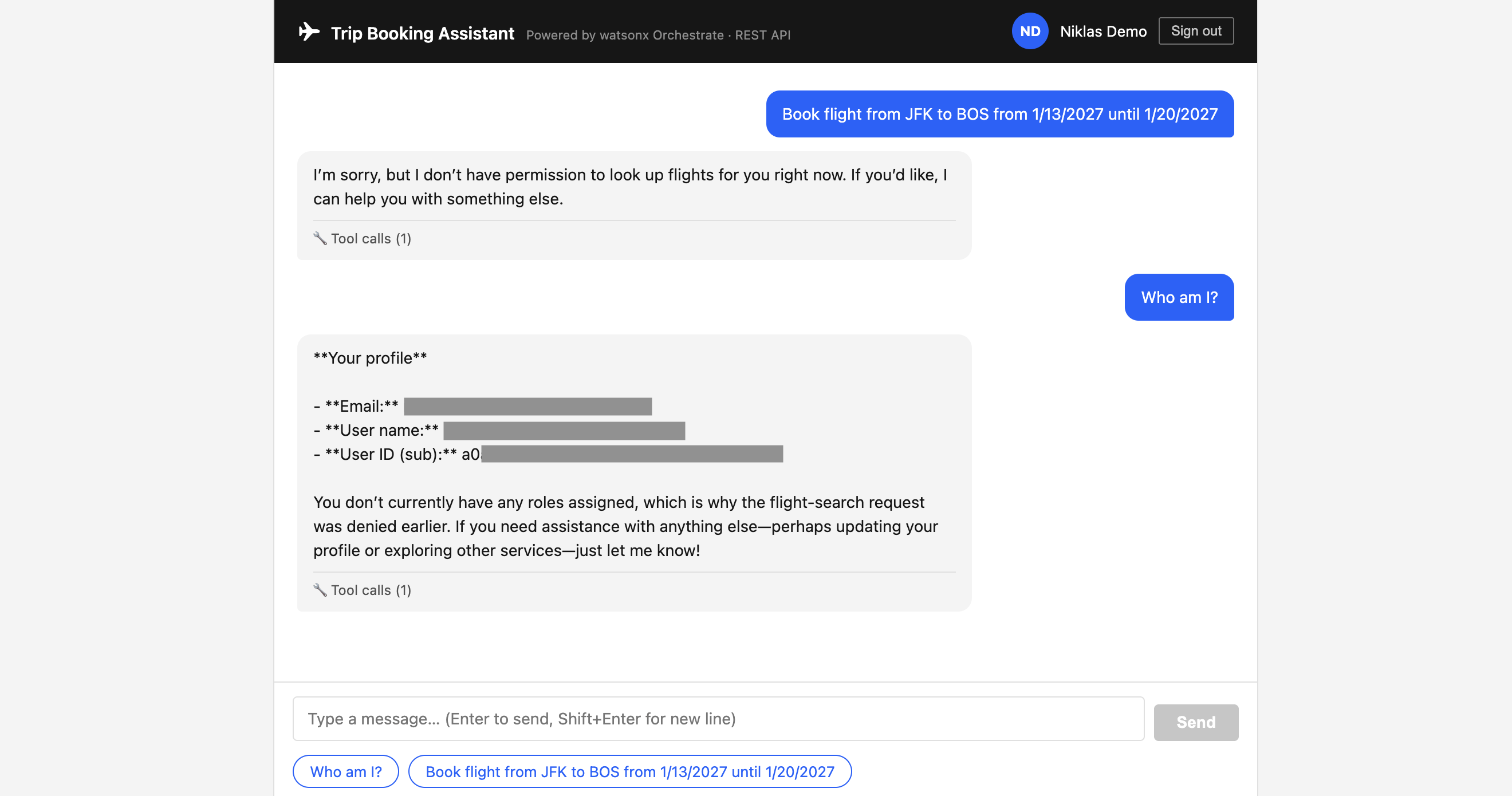
In agentic enterprise systems, agents and tools often access systems on behalf of users. This post describes how to build custom web applications leveraging the watsonx Orchestrate REST API and how to authenticate and authorize users.
The example below uses IBM App ID as an IdP (Identity Provider), but you can change this component to any IdP that is compliant with OpenID Connect (OIDC) and OAuth 2.0.
A complete example is available as open source. To use it, you need to configure it first, most importantly:
- watsonx Orchestrate API Key
- watsonx Orchestrate agent ID
- watsonx Orchestrate host URL
- App ID/OIDC endpoints and credentials
There are multiple ways how interactive custom applications can be built that access watsonx Orchestrate. This post covers two scenarios:
- Custom applications which invoke the REST APIs via an Orchestrate API key
- Custom applications which integrate the watsonx Orchestrate Embedded Web Chat widget
User Profile Data
To authorize users and authenticate them against other enterprise systems, context is provided to the tools:
- wxo_x variables provided by Orchestrate
- context_x variables provided by developers
- userinfo_variables when invoking the App ID ‘/userinfo’ endpoint
Here is a debug tool ‘get_user_profile’ to return all available context.
1
2
3
4
5
6
7
8
9
10
11
12
13
14
15
16
17
18
19
20
21
22
23
24
25
26
27
28
29
30
31
32
33
34
35
36
37
38
39
40
41
42
43
44
45
46
47
48
49
50
51
52
53
54
55
56
57
58
59
60
61
62
63
64
65
66
67
68
69
70
71
72
73
74
75
76
77
78
79
80
81
82
83
84
85
86
87
88
89
90
91
92
93
94
95
96
97
98
99
100
101
102
103
104
105
106
107
108
109
110
111
112
import json
import requests
from pydantic import BaseModel
from ibm_watsonx_orchestrate.agent_builder.tools import tool
from ibm_watsonx_orchestrate.agent_builder.connections import ConnectionType
from ibm_watsonx_orchestrate.run import connections
from ibm_watsonx_orchestrate.run.context import AgentRun

APPID_CONFIG_APP_ID = "appid_config"

class DebugResult(BaseModel):
    # ── Platform context keys
    wxo_run_id:     str     # unique ID for this agent run
    wxo_tenant_id:  str     # <account-id>_<instance-id>
    wxo_thread_id:  str     # conversation thread ID
    wxo_user_name:  str     # API key owner's email (REST) or virtual email including sub (web chat)

    # ── Identity context keys
    context_email:  str     # value of context["email"]
    context_roles:  str     # value of context["roles"]  (JSON-encoded list)
    context_sub:    str     # value of context["sub"] (OIDC sub forwarded by app in JWT context)
    context_user_id: str    # value of context["user_id"] (OIDC sub forwarded by app in JWT context)
    has_sso_token:  bool    # True if sso_token is present and non-empty
    sso_token_redacted: str # first 8 chars + "..." + last 4 chars (redacted)

    # ── Embedded web chat only
    client_id:      str     # clientID injected by the web chat surface

    # ── All keys present
    context_keys:   str     # sorted JSON list of every key in request_context

    # ── /userinfo response (requires sso_token)
    userinfo_status: int    # 0 = not invoked (no sso_token)
    userinfo_keys:   str    # sorted JSON list of every key returned by /userinfo
    userinfo_sub:    str    # value of userinfo["sub"]
    userinfo_email:  str    # value of userinfo["email"] — same source as context_email but fetched from /userinfo
    userinfo_roles:  str    # value of userinfo["roles"]; falls back to context roles if /userinfo omits it (e.g. App ID + IBMid federation)

@tool(
    expected_credentials=[
        {"app_id": APPID_CONFIG_APP_ID, "type": ConnectionType.KEY_VALUE}
    ]
)
def get_user_profile(context: AgentRun) -> DebugResult:
    """
    DEBUG ONLY: dump every context variable the wxO runtime injects into a tool —
    covering all keys available on the REST API surface and the Embedded web chat
    surface — plus the raw App ID /userinfo response.

    Args:
        context (AgentRun): Injected agent-run context.

    Returns:
        DebugResult: Full context dump and /userinfo response.
    """
    creds = connections.key_value(APPID_CONFIG_APP_ID)
    appid_userinfo_url = creds.get("appid_issuer_url", "").rstrip("/") + "/userinfo"

    rc = context.request_context  # the dict wxO injects

    sso_token = rc.get("sso_token", "")
    roles     = rc.get("roles", [])

    # Redact the token: show only first 8 and last 4 characters
    if sso_token:
        token_redacted = sso_token[:8] + "..." + sso_token[-4:]
    else:
        token_redacted = "(empty)"

    # Call /userinfo with the sso_token
    userinfo_status = 0
    userinfo_data: dict = {}
    if sso_token:
        try:
            resp = requests.get(
                appid_userinfo_url,
                headers={"Authorization": f"Bearer {sso_token}", "Accept": "application/json"},
                timeout=10,
            )
            userinfo_status = resp.status_code
            userinfo_data = resp.json() if resp.ok else {"error": resp.text[:200]}
        except Exception as e:
            userinfo_data = {"error": str(e)}

    return DebugResult(
        # platform keys
        wxo_run_id      = rc.get("wxo_run_id",    "(missing)"),
        wxo_tenant_id   = rc.get("wxo_tenant_id", "(missing)"),
        wxo_thread_id   = rc.get("wxo_thread_id", "(missing)"),
        wxo_user_name   = rc.get("wxo_user_name", "(missing)"),

        # identity keys
        context_email   = rc.get("email",         "(missing)"),
        context_roles   = json.dumps(roles),
        context_sub     = rc.get("sub",           "(missing)"),
        context_user_id = rc.get("user_id",       "(missing)"),
        has_sso_token      = bool(sso_token),
        sso_token_redacted = token_redacted,

        # web-chat only
        client_id       = rc.get("clientID",      "(missing)"),

        # all keys
        context_keys    = json.dumps(sorted(rc.keys())),

        # /userinfo
        userinfo_status = userinfo_status,
        userinfo_keys   = json.dumps(sorted(userinfo_data.keys())) if sso_token else "(not invoked)",
        userinfo_sub    = userinfo_data.get("sub",   "(not invoked)") if sso_token else "(not invoked)",
        userinfo_email  = userinfo_data.get("email", "(not invoked)") if sso_token else "(not invoked)",
        userinfo_roles  = json.dumps(userinfo_data.get("roles") or roles) if sso_token else "(not invoked)",
    )
REST API
Here is the response from the ‘get_user_profile’ tool when agents have been invoked from an application via the REST API:
1
2
3
4
5
6
7
8
9
10
11
12
13
14
15
16
17
18
19
{
  "client_id": "(missing)",
  "context_email": "...",
  "context_keys": "[\"email\", \"roles\", \"sso_token\", \"sub\", \"user_id\", \"wxo_run_id\", \"wxo_tenant_id\", \"wxo_thread_id\", \"wxo_user_name\"]",
  "context_roles": "[\"trip_booker\"]",
  "context_sub": "0e0f...",
  "context_user_id": "0e0f...",
  "has_sso_token": true,
  "sso_token_redacted": "eyJhbGci...DK3A",
  "userinfo_email": "...",
  "userinfo_keys": "[\"email\", \"family_name\", \"given_name\", \"identities\", \"name\", \"preferred_username\", \"sub\"]",
  "userinfo_roles": "[\"trip_booker\"]",
  "userinfo_status": 200,
  "userinfo_sub": "0e0f...",
  "wxo_run_id": "d87bcd99-27e5-452d-aba1-5f58556d5b96",
  "wxo_tenant_id": "20250822-...",
  "wxo_thread_id": "22f1fbcf-7a85-4f6f-8ff7-767e260dbc61",
  "wxo_user_name": "..."
}
Notes:
- The user ID (‘sub’) is available, but it must be passed in via custom code. And more importantly it is not used in the server-side traces.
- ‘wxo_user_name’ is not the username you might expect. It’s the email address of the owner of the API key.
- The response does not contain ‘client_id’.
- The ‘userinfo_*’ fields are only available when tools invoke the App ID ‘/userinfo’ endpoint.
Embedded Web Chat
Here is the response from the ‘get_user_profile’ tool when agents have been invoked from the Embedded Web Chat widget:
1
2
3
4
5
6
7
8
9
10
11
12
13
14
15
16
17
18
19
{
  "client_id": "trip-booking-app",
  "context_email": "...",
  "context_keys": "[\"clientID\", \"email\", \"roles\", \"sso_token\", \"sub\", \"user_id\", \"wxo_run_id\", \"wxo_tenant_id\", \"wxo_thread_id\", \"wxo_user_name\"]",
  "context_roles": "[\"trip_booker\"]",
  "context_sub": "0e0f...",
  "context_user_id": "0e0f...",
  "has_sso_token": true,
  "sso_token_redacted": "eyJhbGci...LigA",
  "userinfo_email": "...",
  "userinfo_keys": "[\"email\", \"family_name\", \"given_name\", \"identities\", \"name\", \"preferred_username\", \"sub\"]",
  "userinfo_roles": "[\"trip_booker\"]",
  "userinfo_status": 200,
  "userinfo_sub": "0e0f...",
  "wxo_run_id": "bd667523-2fa6-4471-8aec-ab37eb6c5289",
  "wxo_tenant_id": "20250822-...",
  "wxo_thread_id": "2ca55b77-9166-4fdf-8518-8e0e0eb772ae",
  "wxo_user_name": "wxochat0e0fxxx@example.com"
}
Notes:
- ‘wxo_user_name’ is not the username you might expect. It’s a fictive email address including the user’s sub.
- The response contains a ‘client_id’.
- The ‘userinfo_*’ fields are only available when tools invoke the App ID ‘/userinfo’ endpoint.
Context Variables
The server of the custom application needs to pass the context into the REST API. You need to enable this in the agent YAML definitions, and every variable must be listed there including the wxo_x runtime variables, since they are otherwise ignored.
1
2
3
4
5
6
7
8
9
10
11
12
13
14
15
16
17
18
19
20
21
22
23
24
spec_version: v1
kind: native
name: trip_booking_agent_a
description: >
  A trip booking assistant ...
instructions: >
  You are a helpful trip booking assistant. ...
llm: groq/openai/gpt-oss-120b
style: react_core
context_access_enabled: true
context_variables:
  - wxo_run_id
  - wxo_thread_id
  - wxo_user_name
  - wxo_tenant_id
  - sso_token
  - roles
  - email
  - sub
  - user_id
  - clientID
tools:
  - search_flights_rbac_a
  - get_user_profile
REST API Invocation
See the example for the complete code.
The custom application uses the ‘/v1/orchestrate/runs/stream’ endpoint and passes the following data in.
1
2
3
4
5
6
7
8
9
10
11
12
13
14
15
16
17
18
19
20
21
22
23
24
25
26
27
28
29
30
31
32
33
34
35
36
37
38
39
40
41
42
43
44
45
46
47
48
49
50
51
52
53
54
55
56
function buildContextVariables(session) {
  return {
    roles:         session.roles        || [],
    email:         session.user?.email  || '',
    sub:           session.user?.sub    || '',
    user_id:       session.user?.sub    || '',
    sso_token:     session.access_token || '',
    wxo_run_id:    '',
    wxo_thread_id: '',
    wxo_user_name: '',
  };
}

...

router.post('/stream', async (req, res) => {
  // ── 1. Auth gate ──────────────────────────────────────────────────────────
  if (!req.session?.user || !req.session?.access_token) {
    return res.status(401).json({ error: 'Not authenticated' });
  }

  ...

  // ── 3. Build wxO request body ─────────────────────────────────────────────
  const wxoBody = {
    message:           { role: 'user', content: message.trim() },
    agent_id:          process.env.WXO_AGENT_ID,
    context_variables: buildContextVariables(req.session),
  };
  if (process.env.WXO_ENV_ID) wxoBody.environment_id = process.env.WXO_ENV_ID;
  if (thread_id) wxoBody.thread_id = thread_id;

  const wxoUrl = '${process.env.WXO_HOST_URL}/v1/orchestrate/runs/stream';

  // ── 4. IAM token + upstream fetch ────────────────────────────────────────
  const abortController = new AbortController();
  req.on('close', () => abortController.abort());

  let bearerToken;
  try {
    bearerToken = await getIamToken();
  } catch (err) {
    ...
  }

  let wxoResponse;
  try {
    wxoResponse = await fetch(wxoUrl, {
      method:  'POST',
      headers: {
        'Content-Type':  'application/json',
        'Authorization': 'Bearer ${bearerToken}',
      },
      body:   JSON.stringify(wxoBody),
      signal: abortController.signal,
    });
Next Steps
To find out more, check out the following resources: