
CI/CD and GitOps are standard techniques to deploy software. This post describes one way how this can be done for agents in watsonx Orchestrate.
CI/CD and GitOps
The post GitOps on OpenShift explains CI/CD and GitOps. CI/CD automates software building, testing, and deployment, while GitOps is a modern approach using Git as the single source of truth for infrastructure and application state.
CI/CD:
- Continuous Integration (CI): Developers push code frequently. Automated tests run immediately to ensure the new code doesn’t break the existing build.
- Continuous Delivery/Deployment (CD): Once the code passes tests, it is automatically prepared for release. In delivery, a human clicks ‘Go’; in deployment, the code goes straight to the users.
GitOps:
GitOps takes the ‘Infrastructure as Code’ concept and extends it. It uses Git as the ‘Single Source of Truth’ for your entire infrastructure and applications (Everything as Code). GitOps synchronizes between the ‘to be state’ in the GitOps repo and the ‘is state’ in your environment. Core Principles of GitOps:
- Git branches represent environment state (dev, qa, preprod, prod)
- Git tags mark deployments (v1.2.3-dev, v1.2.3-qa, etc.)
- Git merges promote code between environments
GitOps for Orchestrate
This post provides one approach for watsonx Orchestrate how to leverage Git-based deployments and CI/CD practices that follow GitOps principles to control the lifecycle of agents and associated tools, flows, and other assets.
Key benefits of Git-based deployments:
- GitOps principles (without Kubernetes access)
- Complete isolation between prod and non-prod
- Automatic versioning via Git tags
- Safe promotions via Git merges with approvals
- Easy rollbacks via git revert
- Secret-free Git via runtime secret resolution
- Audit trail via Git history
Architecture
In watsonx Orchestrate there are two environments for each tenant:
- Draft (assets are imported)
- Live (assets are deployed)
Since you typically need four environments, this approach suggests having two tenants:
1
2
3
4
5
6
dev-qa-tenant
  ├─ Draft  = Dev
  └─ Live   = QA
prod-tenant
  ├─ Draft  = PreProd/Staging
  └─ Live   = Production
The ‘to be state’ is defined in a Git repo with four branches:
1
2
3
4
5
6
7
develop (dev-qa-tenant Draft)
  ↓
qa-<version> (dev-qa-tenant Live)
  ↓
staging-<version> (prod-tenant Draft)
  ↓
main (prod-tenant Live) ← PRODUCTION
For versioning semantic tagging is utilized, for example ‘v1.2.0-qa’.
All assets are defined in yaml files. The Orchestrate CLI is used to import them rather than doing everything via CLI parameters.
1
2
3
4
5
6
7
8
9
10
11
12
13
14
15
16
17
18
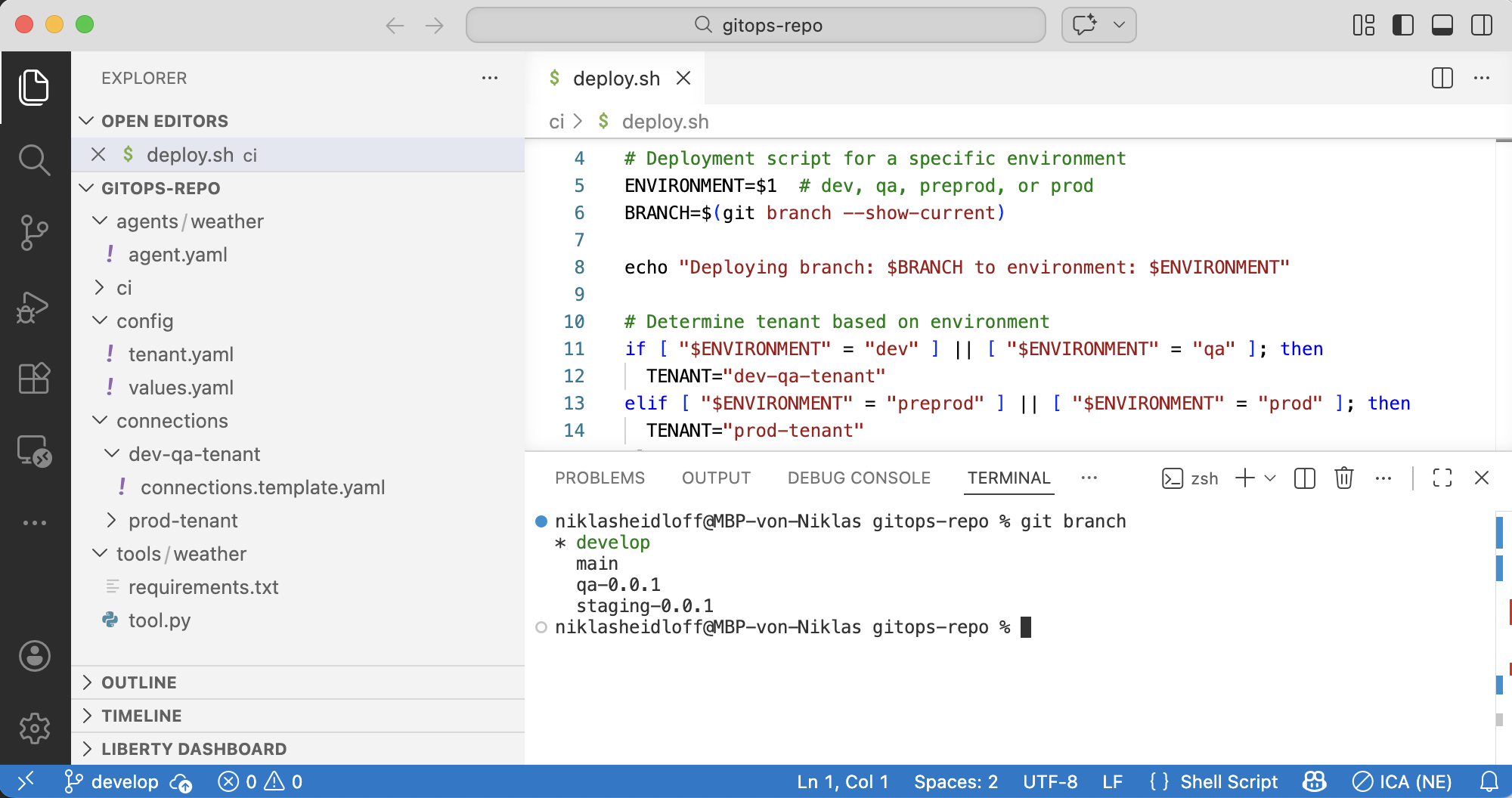
gitops-repo/
  agents/
    weather/
      agent.yaml
  tools/
    weather/
      tool.py
      requirements.txt
  connections/
    dev-qa-tenant/
      connections.template.yaml
    prod-tenant/
      connections.template.yaml
  config/
    tenant.yaml
    values.yaml # Environment variables
  ci/
    ...
Each tenant has its own configuration with the API endpoint URL and the API key. Note that the API key needs to be read from a vault, for example Vault, AWS Secrets Manager, Azure Key Vault or IBM Secrets Manager/Key Protect.
1
2
3
4
5
6
7
8
9
10
tenant:
  name: dev-qa-tenant
  id: "tenant-12345-dev-qa"
  wxo_environment: draft
  api_endpoint: "https://dev-qa.wxo.example.com/api"
  auth:
    type: api_key
    secret_ref: "wxo/dev-qa-tenant/api-key" # reference to secrets manager
branch: dev
logical_environment: dev
Workflows
Changes are pushed or merged to any environment branch (dev, qa, preprod, prod) which triggers the pipeline:
- Detect branch
- Checkout code
- Load tenant config
- Generate version tag
- Fetch secrets
- Authenticate (set up Orchestrate CLI with tenant-specific credentials)
- Resolve connections, substitute secrets and deploy them
- Deploy tools
- Deploy agents
- Run tests
- Tag deployment
- Notify stakeholders
Here is a sample promotion workflow from dev to qa. Note that the branches have different approval gates:
- Develop and test in dev branch (dev-qa-tenant Draft)
- Create PR: dev → qa
- PR review + approval
- Merge triggers pipeline
- Auto-deploys to dev-qa-tenant Live (QA)
- Git tag created: v1.2.3-qa
Sample deployment script:
1
2
3
4
5
6
7
8
9
10
11
12
13
14
15
16
17
18
19
20
21
22
23
24
25
26
27
28
29
30
31
32
33
34
35
36
37
38
39
40
41
42
43
44
45
46
47
#!/bin/bash
set -e

ENVIRONMENT=$1  # dev, qa, preprod, or prod
BRANCH=$(git branch --show-current)
echo "Deploying branch: $BRANCH to environment: $ENVIRONMENT"

if [ "$ENVIRONMENT" = "dev" ] || [ "$ENVIRONMENT" = "qa" ]; then
  TENANT="dev-qa-tenant"
elif [ "$ENVIRONMENT" = "preprod" ] || [ "$ENVIRONMENT" = "prod" ]; then
  TENANT="prod-tenant"
else
  echo "Invalid environment: $ENVIRONMENT"
  exit 1
fi

echo "Activating tenant: $TENANT"
orchestrate env activate $TENANT

# Deploying connections...
# Replace placeholders in connections yaml files with values from vault
# ...

echo "Deploying flows..."
for tool_dir in tools/*/; do
  tool_name=$(basename "$tool_dir")
  if [ -f "$tool_dir/workflow.py" ]; then
    echo "Deploying flow: $tool_name"
    orchestrate tools import -k flow -f "$tool_dir/workflow.py"
  fi
done

echo "Deploying agents..."
for agent_dir in agents/*/; do
  agent_name=$(basename "$agent_dir")
  if [ -f "$agent_dir/agent.yaml" ]; then
    echo "Deploying agent: $agent_name"
    if [ "$ENVIRONMENT" = "dev" ] || [ "$ENVIRONMENT" = "preprod" ]; then
      orchestrate agents import -f "$agent_dir/agent.yaml"
    elif [ "$ENVIRONMENT" = "qa" ] || [ "$ENVIRONMENT" = "prod" ]; then
      orchestrate agents deploy --name "$agent_name"
    fi
  fi
done

echo "Note: Tools are automatically deployed when agents reference them in tools: section"
echo "Deployment to $ENVIRONMENT ($TENANT) completed successfully!"
With GitOps implemented you can perform rollbacks, for example an emergency rollback in the production environment:
1
2
3
4
5
6
7
8
9
10
11
12
13
# 1. Identify last known good tag
git tag -l "v*-prod" --sort=-version:refname | head -5

# 2. Create emergency rollback branch
git checkout -b emergency-rollback-prod v1.2.0-prod

# 3. Force merge to prod (with approvals)
git checkout prod
git reset --hard emergency-rollback-prod
git push --force origin prod

# 4. Pipeline redeploys v1.2.0 to prod-tenant Live
# 5. Post-mortem to understand root cause
Extensions
The technique above is a simple sample how to do Git-based deployments for watsonx Orchestrate. For more advanced scenarios the technique needs to be extended to cover the following topics:
- Backwards compatibility of agents and tools
- Multiple repos
- Merge conflicts handling (e.g. config files)
- Branch protection rules and quality gates
Next Steps
To find out more, check out the following resources: