
Customizing watsonx Orchestrate agents with plug-ins unlocks powerful ways to shape how agents interpret inputs and produce outputs. By integrating plug-ins that filter, sanitize, or transform data, teams can enforce critical safety, guardrails, security, and regulatory requirements. This post explores how input and output plug-ins strengthen agent reliability and trustworthiness.
Watsonx Orchestrate has recently added plug-ins:
Plug-ins play a role in enhancing the capabilities and robustness of agents. They help enable custom behavior to be easily added to an agent’s processing flow, allowing modifications to incoming input or outgoing output. This customization is essential for applications where agents must comply with safety, security, and regulatory requirements.
There are two types of plug-ins that are triggered every time agents are invoked:
- Input plug-ins: Operate before the agent processes a request, inspecting and potentially modifying incoming messages
- Output plug-ins: Run after the agent generates a response, refining or changing the final output before it returns to the user
The MCP gateway Context Forge supports plug-ins too. They are slightly different but give some ideas of the breadth of use cases that can be implemented with them.
Let’s look at two examples.
Input Plug-ins
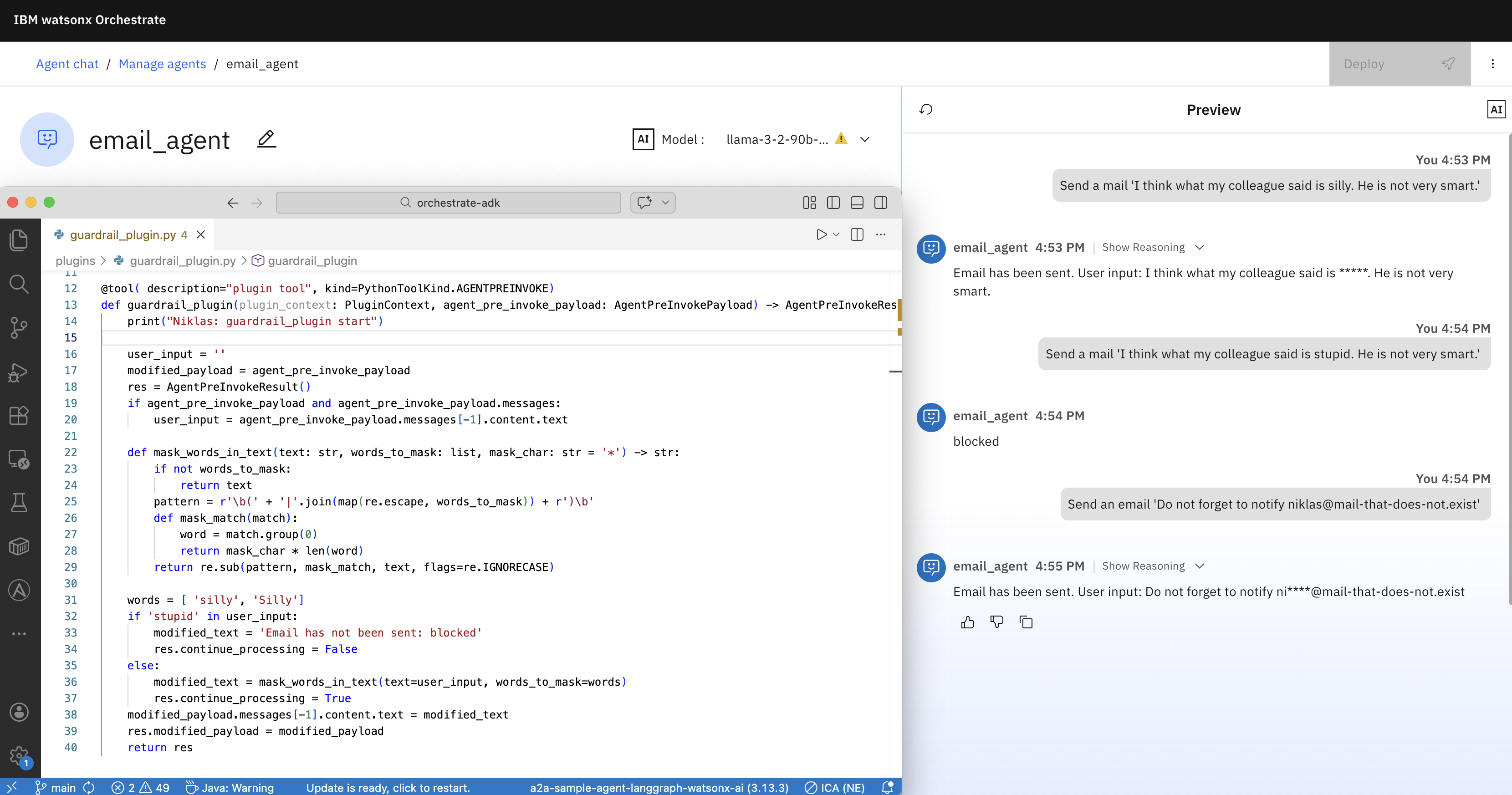
The first example demonstrates an input plug-in. The word ‘silly’ is masked and texts with the word ‘stupid’ are blocked.
1
2
3
User: Send a mail 'I think what my colleague said is silly. He is not very smart.'
Agent: Email has been sent. User input: I think what my colleague said is *****.
       He is not very smart.
1
2
User: Send a mail 'I think what my colleague said is stupid. He is not very smart.'
Agent: Email has not been sent: blocked
Code of a plug-in tool with the kind PythonToolKind.AGENTPREINVOKE:
1
2
3
4
5
6
7
8
9
10
11
12
13
14
15
16
17
18
19
20
21
22
23
24
25
26
27
28
@tool( description="plugin tool", kind=PythonToolKind.AGENTPREINVOKE)
def guardrail_plugin(plugin_context: PluginContext, agent_pre_invoke_payload: AgentPreInvokePayload) -> AgentPreInvokeResult:
    print("Niklas: guardrail_plugin start")
    user_input = ''
    modified_payload = agent_pre_invoke_payload
    res = AgentPreInvokeResult()
    if agent_pre_invoke_payload and agent_pre_invoke_payload.messages:
        user_input = agent_pre_invoke_payload.messages[-1].content.text

    def mask_words_in_text(text: str, words_to_mask: list, mask_char: str = '*') -> str:
        if not words_to_mask:
            return text
        pattern = r'\b(' + '|'.join(map(re.escape, words_to_mask)) + r')\b'
        def mask_match(match):
            word = match.group(0)
            return mask_char * len(word)
        return re.sub(pattern, mask_match, text, flags=re.IGNORECASE)

    words = [ 'silly', 'Silly']
    if 'stupid' in user_input:
        modified_text = 'Email has not been sent: blocked'
        res.continue_processing = False
    else:
        modified_text = mask_words_in_text(text=user_input, words_to_mask=words)
        res.continue_processing = True
    modified_payload.messages[-1].content.text = modified_text
    res.modified_payload = modified_payload
    return res
In addition to the user input, plug-in implementations can access the context:
1
2
3
4
5
6
7
8
9
10
11
12
13
14
15
16
17
18
"state": {
  "context": {
    "wxo_email_id": "xxxx@yyyyy.com",
    "wxo_tenant_id": "AAAAA-BBBBB-CCCCC-...",
    "wxo_user_name": "AAAA BBBB"
  }
},
"global_context": {
  "request_id": "xxx",
  "user": "xxxx@yyyyy.com",
  "tenant_id": "AAAAA-BBBBB-CCCCC-...",
  "server_id": null,
  "state": {},
  "metadata": {}
},
"metadata": {
  "action": "ALL"
}
Plug-ins also get the user input (AGENTPREINVOKE) or potentially modified user input (AGENTPOSTINVOKE) passed:
1
2
3
4
5
6
7
8
9
10
11
"agent_id": "2cd262f1-f5c5-44a1-996f-5ed592350468",
"messages": [
  {
    "role": "user",
    "content": {
      "type": "text",
      "text": "An email with the body 'Hi everyone' has been sent."
    }
  }
],
tools_calls: []
Output Plug-ins
The next example shows how to mask information.
1
2
User: Send an email 'Do not forget to notify niklas@mail-that-does-not.exist'
Agent: Email has been sent. User input: 'Do not forget to notify ni****@mail-that-does-not.exist'
Code of a plug-in tool with the kind PythonToolKind.AGENTPOSTINVOKE:
1
2
3
4
5
6
7
8
9
10
11
12
13
14
15
16
17
18
19
20
21
22
23
24
25
26
27
28
29
30
31
@tool(description="plugin tool", kind=PythonToolKind.AGENTPOSTINVOKE)
def email_masking_plugin(plugin_context: PluginContext, agent_post_invoke_payload: AgentPostInvokePayload) -> AgentPostInvokeResult:
    print("Niklas: email_masking_plugin start")
    result = AgentPostInvokeResult()

    def mask_emails_in_text(text: str, mask_char: str = '*') -> str:
        def mask_email(match):
            email = match.group(0)
            local, domain = email.split('@', 1)
            visible = min(2, len(local))
            masked_local = local[:visible] + mask_char * (len(local) - visible)
            return f"{masked_local}@{domain}"
        email_pattern = r'[A-Za-z0-9._%+-]+@[A-Za-z0-9.-]+\.[A-Za-z]{2,}'
        return re.sub(email_pattern, mask_email, text)
    if agent_post_invoke_payload is None or agent_post_invoke_payload.messages is None or len(agent_post_invoke_payload.messages) == 0:
        result.continue_processing = False
        return result
    first_msg = agent_post_invoke_payload.messages[0]
    content = getattr(first_msg, "content", None)
    if content is None or not hasattr(content, "text") or content.text is None:
        result.continue_processing = False
        return result

    masked_text = mask_emails_in_text(content.text)
    new_content = TextContent(type="text", text=masked_text)
    new_message = Message(role=first_msg.role, content=new_content)
    modified_payload = agent_post_invoke_payload.copy(deep=True)
    modified_payload.messages[0] = new_message
    result.continue_processing = True
    result.modified_payload = modified_payload
    return result
Plug-in Registrations
Plug-ins are registered in the definition of an agent:
1
2
3
4
5
6
7
8
9
10
11
12
spec_version: v1
kind: native
style: default
name: email_agent
llm: watsonx/meta-llama/llama-3-2-90b-vision-instruct
description: Send Email with content
tools: [send_email_tool]
plugins:
  agent_pre_invoke:
      - plugin_name: guardrail_plugin
  agent_post_invoke:
      - plugin_name: email_masking_plugin
The plug-ins are invoked before and after the send_email_tool tool.
1
2
3
4
5
6
7
8
9
10
11
12
@tool()
def send_email_tool(input: str) -> str:
    """Sends an Email based on the provided input.
    The mail is sent to a hardcoded recipient.
    Args:
        input (str): The input of the tool.
    Returns:
        str: The action of the tool.
    """
    #functionality of the tool
    print("Niklas: send_email_tool start")
    return f"Email has been sent. User input: {input}"
Plug-ins are imported like other tools:
1
2
3
4
5
orchestrate tools import -k python -f plugins/send_email_tool.py
orchestrate tools import -k python -f plugins/guardrail_plugin.py
orchestrate tools import -k python -f plugins/email_masking_plugin.py

orchestrate agents import -f plugins/agent.yaml
To debug plug-ins you can add printouts and read the logs:
1
orchestrate server logs | grep Niklas
Next Steps
To find out more, check out the following resources: