

Some developers are scared when they hear terms like CLI (Command Line Interface), Terminal and Bash. However, most pro-code developers love these low-level tools. This post describes a CLI called IBM Bob Shell and its value on top of the Bob IDE.
Bob is an AI SDLC (Software Development Lifecycle) partner that helps developers work confidently with real codebases. Bob augments your existing workflows and provides proactive insights. It supports developers as they reason about code and make decisions.
There are different types of developers, for example junior developers and senior developers. Some developers build software almost exclusively in their roles, other developers, for example tech sellers, have additional responsibilities and have less time to write code. The usage of CLIs is not as easy as using IDEs (Integrated Development Environments). Not every developer has the skills and time to leverage them.
But CLIs provide unique capabilities and advantages which are described below. In case of Bob Shell these are:
- Bob Shell for full Control
- IDE Supplement for even higher Productivity
- Automation and server-side usage, for example for DevOps
Bob Shell
The Bob Shell can be run standalone in a terminal.

Some developers prefer working in terminals rather than graphical frontends. The main reason is productivity!
Terminals allow them to keep their hands on the keyboard. There are keystrokes for everything. Having to switch between a keyboard and a mouse is less efficient. Some developers even prefer terminal-based low level editors like VIM rather than popular environments like Visual Studio Code.
Bob Shell provides a rich set of functionalities, including features you cannot use in the Bob IDE, for example, you have full control about settings and individual configuration.
IDE Supplement
Bob provides an integration of Bob Shell in Bob IDE. This brings together the best of both worlds.
Example 1
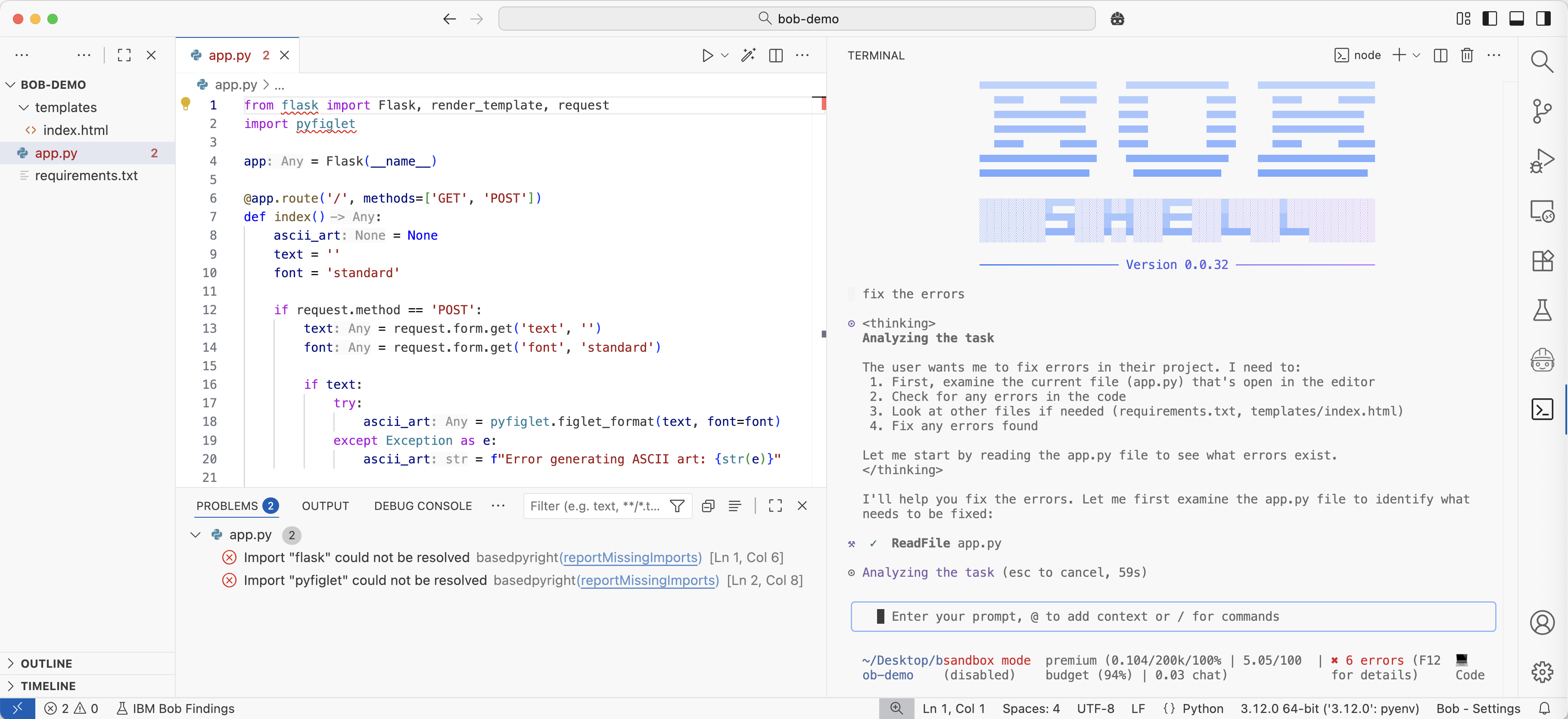
In Bob Shell you need to refer to files. In the IDE Bob knows automatically the context like the opened files and the current cursor position. When running Bob Shell in the IDE, you can get access to this context implicitly.
The prompt ‘fix the errors’ knows the errors in app.py are meant.
Example 2
AI-based software tools generate code. As developer you need to stay in control and understand the changes. Editors in IDEs provide much easier ways to read and understand the changes. With Bob you can run Bob Shell commands and the output is displayed in the IDE.
The screenshot at the top of this post shows how developers can review, approve, reject or improve the generated code.
Automation
Another big advantage of the Bob Shell is the ability to run in the background and without interactions:
- Integrating Bob Shell into automation scripts or CI/CD pipelines
- Processing multiple files with a single command
I like especially the first point. With Bob Shell you unlock DevOps. Pipelines can fail and often be fixed automatically via AI. Similarly, workflows (e.g. GitHub actions) can be triggered when new tickets are created to generate PRs with fixes, new code can automatically be reviewed, and more.
Here are some examples:
1
2
3
4
5
bob -p "Explain this project"
cat prompt.txt | bob
cat buildError.txt | bob -p "Explain this build error"
bob -p "Review @file.java" > review.md
bob -p "Summarize the functionality in @src/main.js"
Next Steps
To find out more, check out the following resources: